bilibili黑马四十九讲SpringBoot
37.Boot 骨架项目 使用 IDEA 创建 SpringBoot 项目时,会创建出 .mvn 目录、HELP.md、mvnw 和 mvnw.cmd 等不必要的文件。
Windows 下的Docker 这篇文章里介绍了如何在 windows 下安装 WSL。
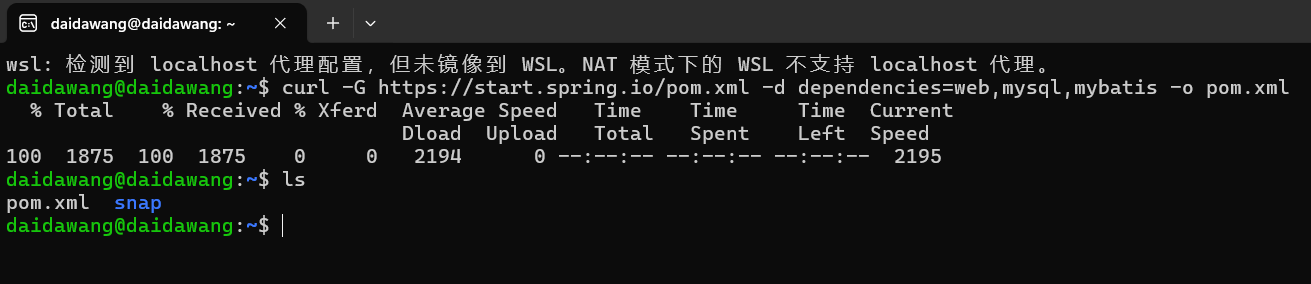
进入 WSL,并输入
curl -G [https://start.spring.io/pom.xml](https://start.spring.io/pom.xml) -d dependencies=web,mysql,mybatis -o pom.xml
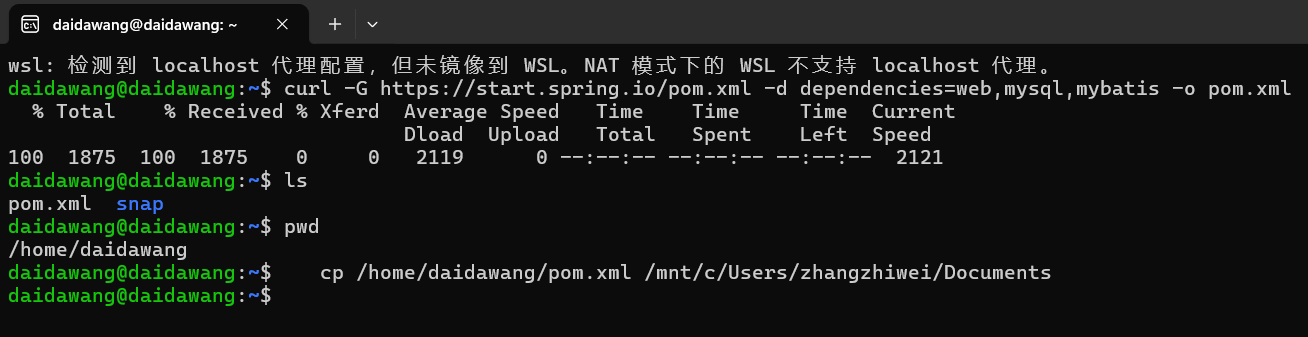
查看当前目录:pwd
手动指定路径并复制文件:
cp /home/daidawang/pom.xml /mnt/c/Users/zhangzhiwei/Documents/demo
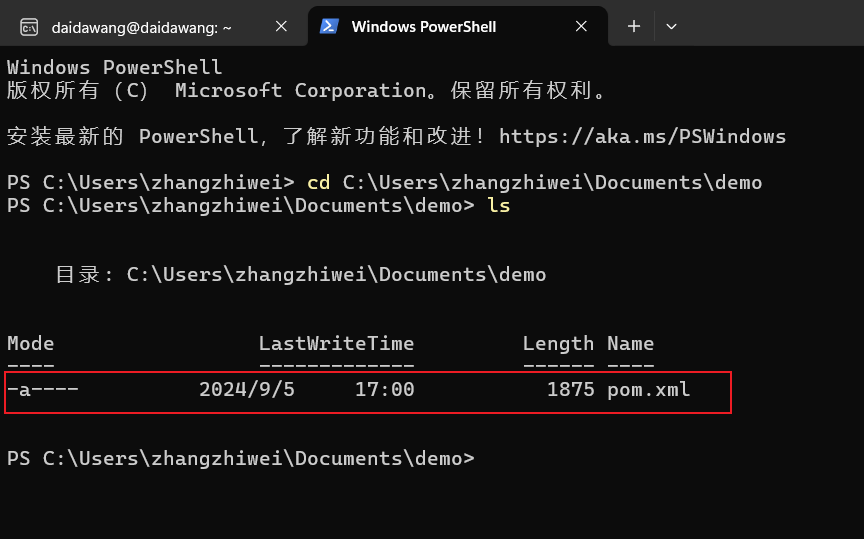
进入指定路径: cd C:\Users\zhangzhiwei\Documents\demo
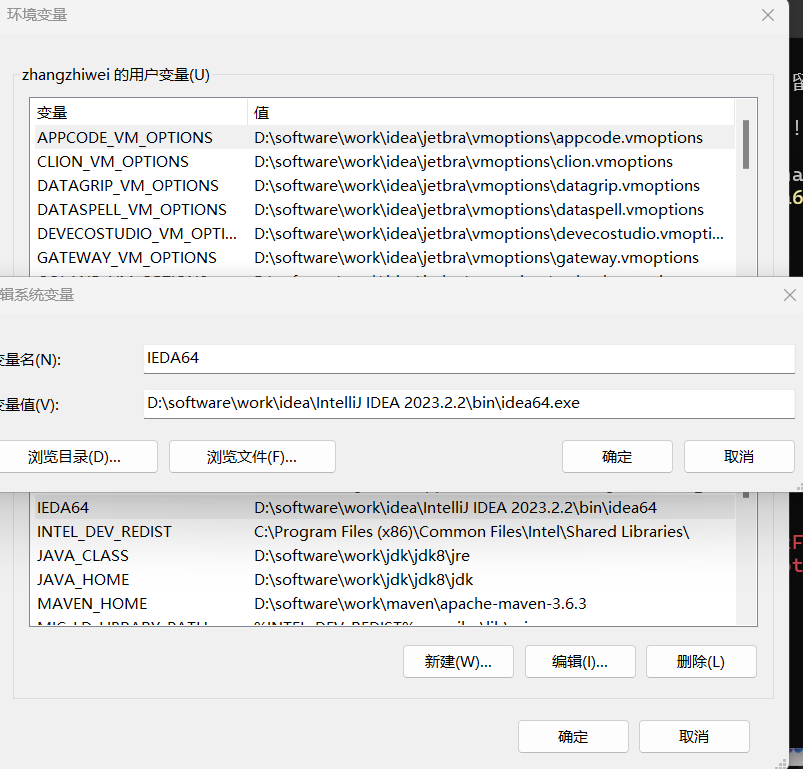
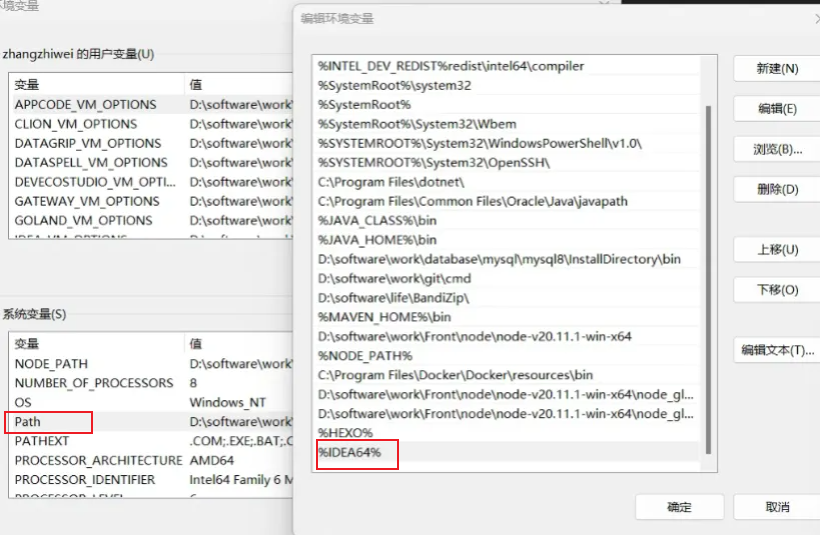
配置 idea 环境变量:
将 IDEA64 变量添加到 PATH
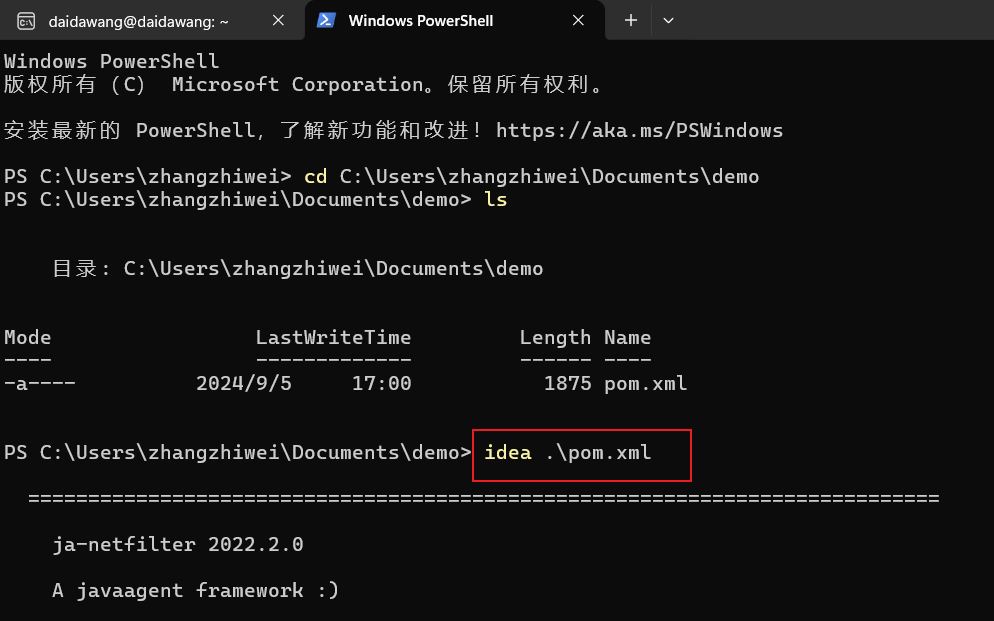
输入 idea .\pom.xml
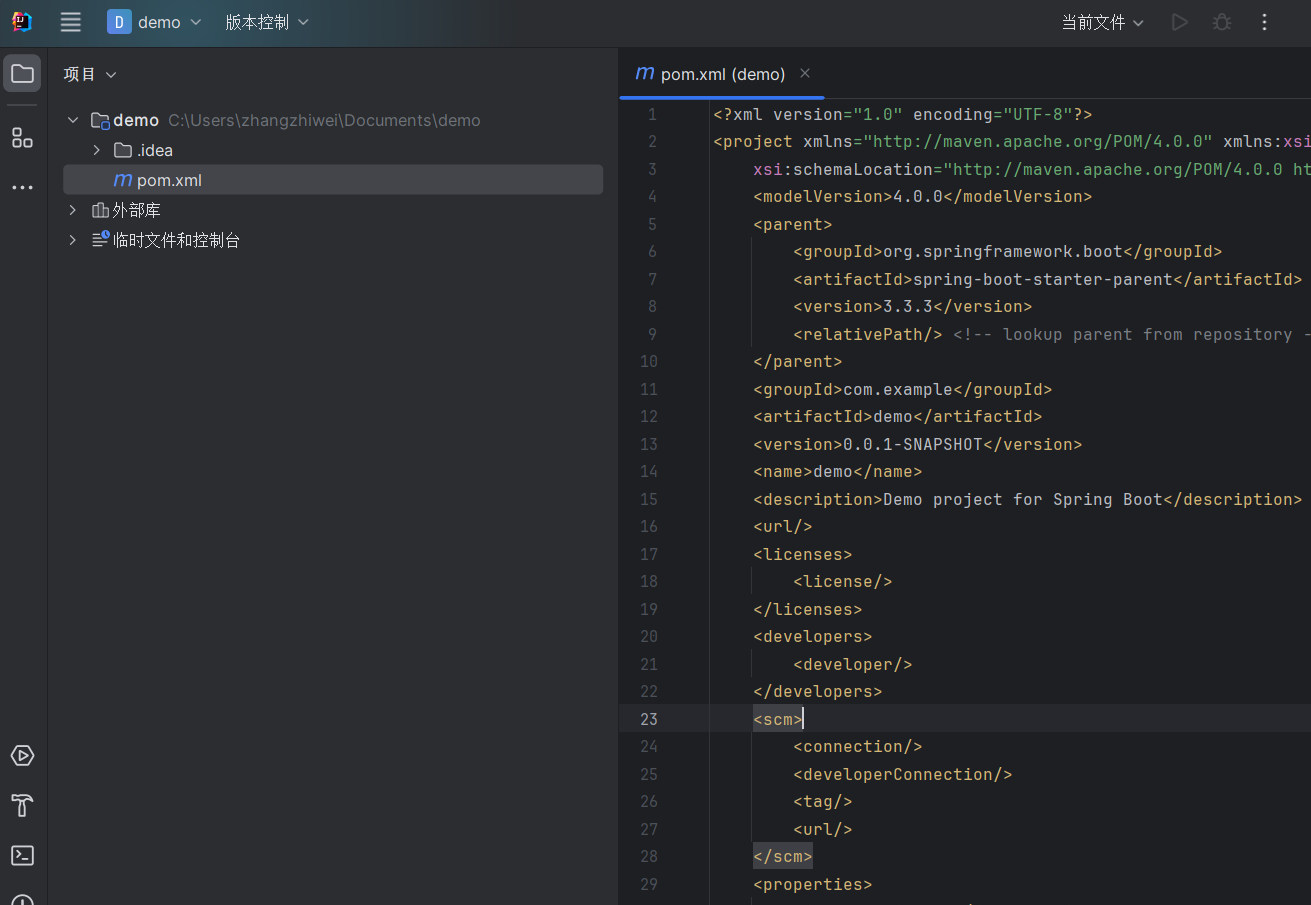
idea 根据 pom 创建项目:
38.构建 spring war 项目 39.boot 启动流程 SpringBoot 的主启动类类似于:
1
2
3
4
5
6
@SpringBootApplication public class BootApplication { public static void main (String[] args) { SpringApplication.run(BootApplication.class, args); } }
其中 SpringApplication#run() 方法是核心方法:
1
2
3
4
5
6
7
public static ConfigurableApplicationContext run (Class<?> primarySource, String... args) { return run(new Class <?>[] { primarySource }, args); } public static ConfigurableApplicationContext run (Class<?>[] primarySources, String[] args) { return new SpringApplication (primarySources).run(args); }
最终使用 new 关键字构造了 SpringApplication 对象,然后调用了下面非静态的 run()方法:
1
2
3
4
5
6
7
8
9
10
11
12
13
14
15
16
public SpringApplication (Class<?>... primarySources) { this (null , primarySources); } @SuppressWarnings({ "unchecked", "rawtypes" }) public SpringApplication (ResourceLoader resourceLoader, Class<?>... primarySources) { this .resourceLoader = resourceLoader; Assert.notNull(primarySources, "PrimarySources must not be null" ); this .primarySources = new LinkedHashSet <>(Arrays.asList(primarySources)); this .webApplicationType = WebApplicationType.deduceFromClasspath(); this .bootstrapRegistryInitializers = new ArrayList <>( getSpringFactoriesInstances(BootstrapRegistryInitializer.class)); setInitializers((Collection) getSpringFactoriesInstances(ApplicationContextInitializer.class)); setListeners((Collection) getSpringFactoriesInstances(ApplicationListener.class)); this .mainApplicationClass = deduceMainApplicationClass(); }
39.1 SpringApplication 构造分析 构造 SpringApplication 对象时做了如下几件事:
获取 BeanDefinition 对象。根据各种来源 添加 BeanDefinition(xml、配置类等)
推断应用类型。
添加 ApplicationContext 初始化器
添加事件监听器
主类推断 。得到当前方法运行的所在类
获取 BeanDefinition 源 1 2 3 4 5 6 7 8 9 10 11 12 13 14 15 16 17 18 19 20 21 22 23 24 @Configuration public class A39_1 { public static void main (String[] args) { SpringApplication application = new SpringApplication (A39_1.class); application.setSources(Set.of("classpath:b01.xml" )); ConfigurableApplicationContext context = application.run(args); for (String beanDefinitionName : context.getBeanDefinitionNames()) { String resourceDescription = context.getBeanFactory().getBeanDefinition(beanDefinitionName).getResourceDescription(); System.out.println("名称: " +beanDefinitionName +" 资源来源: " +resourceDescription); } context.close(); } static class Bean2 {} @Bean public Bean2 bean2 () { return new Bean2 (); } }
1 2 3 4 5 6 7 8 9 10 11 12 *************************** APPLICATION FAILED TO START *************************** Description: Web application could not be started as there was no org.springframework.boot.web.servlet.server.ServletWebServerFactory bean defined in the context. Action: Check your application's dependencies for a supported servlet web server. Check the configured web application type.
这是因为添加了 spring-boot-starter-web 依赖,但 Spring 容器中并没有 SerletWebServerFactory 类型的 Bean。向容器添加:
1 2 3 4 5 6 @Bean public TomcatServletWebServerFactory servletWebServerFactory () { TomcatServletWebServerFactory tomcatServletWebServerFactory = new TomcatServletWebServerFactory (); tomcatServletWebServerFactory.setPort(8081 ); return tomcatServletWebServerFactory; }
1 2 3 4 5 6 7 8 9 name: org.springframework.context.annotation.internalConfigurationAnnotationProcessor 来源: null name: org.springframework.context.annotation.internalAutowiredAnnotationProcessor 来源: null name: org.springframework.context.annotation.internalCommonAnnotationProcessor 来源: null name: org.springframework.context.event.internalEventListenerProcessor 来源: null name: org.springframework.context.event.internalEventListenerFactory 来源: null name: a39_1 来源: null name: org.springframework.boot.autoconfigure.internalCachingMetadataReaderFactory 来源: null name: bean2 来源: indi.mofan.a39.A39_1 name: servletWebServerFactory 来源: indi.mofan.a39.A39_1
来源为 null的 Bean 是 Spring 提供的 内置 Bean
使用 XML 配置文件添加 Bean,并利用 setSources() 方法设置创建 ApplicationContext 的其他来源:
1 2 3 4 5 public static void main (String[] args) { SpringApplication spring = new SpringApplication (A39_1.class); spring.setSources(Collections.singleton("classpath:b01.xml" )); }
创建 b01.xml
1 2 3 4 5 6 7 <?xml version="1.0" encoding="UTF-8" ?> <beans xmlns ="http://www.springframework.org/schema/beans" xmlns:xsi ="http://www.w3.org/2001/XMLSchema-instance" xsi:schemaLocation ="http://www.springframework.org/schema/beans http://www.springframework.org/schema/beans/spring-beans.xsd" > <bean id ="bean1" class ="com.example.boot.A39_1" > </bean > </beans >
再次运行多出如下:
1 名称: bean1 资源来源: class path resource [b01.xml]
推断应用类型 应用类型的推断在构造方法中可以看到:
1 2 3 4 5 6 public SpringApplication (ResourceLoader resourceLoader, Class<?>... primarySources) { this .webApplicationType = WebApplicationType.deduceFromClasspath(); }
推断逻辑由 WebApplicationType 枚举中的 deduceFromClasspath() 方法完成:
1 2 3 4 5 6 7 8 9 10 11 12 13 14 15 16 static WebApplicationType deduceFromClasspath () { if (ClassUtils.isPresent(WEBFLUX_INDICATOR_CLASS, null ) && !ClassUtils.isPresent(WEBMVC_INDICATOR_CLASS, null ) && !ClassUtils.isPresent(JERSEY_INDICATOR_CLASS, null )) { return WebApplicationType.REACTIVE; } for (String className : SERVLET_INDICATOR_CLASSES) { if (!ClassUtils.isPresent(className, null )) { return WebApplicationType.NONE; } } return WebApplicationType.SERVLET; }
利用反射调用 方法
1 2 3 4 5 6 7 8 9 10 @SneakyThrows public static void main (String[] args) { Method deduceFromClasspath = WebApplicationType.class.getDeclaredMethod("deduceFromClasspath" ); deduceFromClasspath.setAccessible(true ); System.out.println("\t应用类型为: " + deduceFromClasspath.invoke(null )); }
添加 ApplicationContext 初始化器 调用 SpringApplication#run() 方法时会创建 ApplicationContext,最后调用 ApplicationContext#refresh() 方法完成初始化。
在创建与初始化完成之间的一些拓展功能就由 ApplicationContext 初始化器完成。
在 SpringApplication 的构造方法中,添加的初始化器信息从配置文件中读取:
1 2 3 4 5 6 public SpringApplication (ResourceLoader resourceLoader, Class<?>... primarySources) { setInitializers((Collection) getSpringFactoriesInstances(ApplicationContextInitializer.class)); }
也可以调用 SpringApplication 对象的 addInitializers() 方法添加自定义初始化器:
1 2 3 4 5 6 7 8 9 10 11 12 13 14 15 16 17 18 19 20 21 22 @SneakyThrows public static void main (String[] args) { spring.addInitializers(applicationContext -> { if (applicationContext instanceof GenericApplicationContext) { GenericApplicationContext context = (GenericApplicationContext) applicationContext; context.registerBean("bean3" , Bean3.class); } }); ConfigurableApplicationContext context = spring.run(args); Arrays.stream(context.getBeanDefinitionNames()).forEach(i -> { System.out.println("name: " + i + " 来源: " + context.getBeanFactory().getBeanDefinition(i).getResourceDescription()); }); context.close(); } static class Bean3 {}
添加事件监听器 与添加 ApplicationContext 初始化器一样,在 SpringApplication 的构造方法中,添加的事件监听器信息从配置文件中读取:
1 2 3 4 5 6 public SpringApplication (ResourceLoader resourceLoader, Class<?>... primarySources) { setListeners((Collection) getSpringFactoriesInstances(ApplicationListener.class)); }
可以调用 SpringApplication 对象的 addListeners() 方法添加自定义事件监听器:
1 2 3 4 5 6 7 8 @SneakyThrows public static void main (String[] args) { spring.addListeners(event -> System.out.println("\t事件为: " + event)); context.close(); }
1 2 3 4 5 6 7 8 9 10 11 12 事件类型为: class org.springframework.boot.context.event.ApplicationStartingEvent 事件类型为: class org.springframework.boot.context.event.ApplicationEnvironmentPreparedEvent 事件类型为: class org.springframework.boot.context.event.ApplicationContextInitializedEvent 事件类型为: class org.springframework.boot.context.event.ApplicationPreparedEvent 事件类型为: class org.springframework.boot.web.servlet.context.ServletWebServerInitializedEvent 事件类型为: class org.springframework.context.event.ContextRefreshedEvent 事件类型为: class org.springframework.boot.context.event.ApplicationStartedEvent 事件类型为: class org.springframework.boot.availability.AvailabilityChangeEvent 事件类型为: class org.springframework.boot.context.event.ApplicationReadyEvent 事件类型为: class org.springframework.boot.availability.AvailabilityChangeEvent 事件类型为: class org.springframework.boot.availability.AvailabilityChangeEvent 事件类型为: class org.springframework.context.event.ContextClosedEvent
主类推断 主类推断在构造方法中可以看到:
1 2 3 4 5 public SpringApplication (ResourceLoader resourceLoader, Class<?>... primarySources) { this .mainApplicationClass = deduceMainApplicationClass(); }
推断逻辑由 deduceMainApplicationClass() 方法完成,利用反射调用该方法:
1 2 3 4 5 6 7 8 9 10 @SneakyThrows public static void main (String[] args) { Method deduceMainApplicationClass = SpringApplication.class.getDeclaredMethod("deduceMainApplicationClass" ); deduceMainApplicationClass.setAccessible(true ); System.out.println("\t主类是: " + deduceMainApplicationClass.invoke(spring)); }
1 主类推断为: class com.example.boot.A39_1
39.2 SpringApplication run 分析 1 2 3 4 5 6 @SpringBootApplication public class BootApplication { public static void main (String[] args) { SpringApplication.run(BootApplication.class, args); } }
1 2 3 4 5 6 7 public static ConfigurableApplicationContext run (Class<?> primarySource, String... args) { return run(new Class <?>[] { primarySource }, args); } public static ConfigurableApplicationContext run (Class<?>[] primarySources, String[] args) { return new SpringApplication (primarySources).run(args); }
构造方法 new SpringApplication(primarySources)已经讲完,接下来看 run() 方法
第一步 得到 SpringApplicationRunListeners 事件发布器
在执行 run() 方法时,先获取到 SpringApplicationRunListeners,它是事件发布器组合,
作用是:在 Spring Boot 启动各个阶段发布事件。
SpringApplicationRunListeners 中使用 SpringApplicationRunListener 来描述单个事件发布器,
SpringApplicationRunListener 是一个接口,它有且仅有一个实现类 EventPublishingRunListener。
事件发布器都是在配置文件中读取,从 META-INFO/spring.factories 中读取,该文件中有这样一句:
1 2 3 # Run Listeners org.springframework.boot.SpringApplicationRunListener=\ org.springframework.boot.context.event.EventPublishingRunListener
从 META-INFO/spring.factories配置文件读取事件发布器信息,并发布各种事件
1 2 3 4 5 6 7 8 9 10 11 12 13 14 15 16 17 18 19 20 21 22 23 24 25 26 27 28 29 30 31 32 33 34 35 36 37 38 39 40 41 42 43 44 45 46 47 48 49 public class A39 { @SneakyThrows public static void main (String[] args) { SpringApplication app = new SpringApplication (); app.addListeners(e-> System.out.println(e.getClass())); List<String> names = SpringFactoriesLoader.loadFactoryNames (SpringApplicationRunListener.class, A39.class.getClassLoader()); for (String name : names) { System.out.println(name); Class<?> clazz = Class.forName(name); Constructor<?> constructor = clazz.getConstructor(SpringApplication.class, String[].class); SpringApplicationRunListener publisher = (SpringApplicationRunListener) constructor.newInstance(app, args); DefaultBootstrapContext bootstrapContext = new DefaultBootstrapContext (); publisher.starting(bootstrapContext); publisher.environmentPrepared(bootstrapContext, new StandardEnvironment ()); GenericApplicationContext context = new GenericApplicationContext (); publisher.contextPrepared(context); publisher.contextLoaded(context); context.refresh(); publisher.started(context,null ); publisher.ready(context,null ); publisher.failed(context, new RuntimeException ("启动失败" )); } } }
在 SpringBoot 启动过程中,总共发布 7 种事件。
运行 main() 方法后,控制台打印出:
1 2 3 4 5 6 7 8 9 10 11 org.springframework.boot.context.event.EventPublishingRunListener class org.springframework.boot.context.event.ApplicationStartingEvent class org.springframework.boot.context.event.ApplicationEnvironmentPreparedEvent class org.springframework.boot.context.event.ApplicationContextInitializedEvent class org.springframework.boot.context.event.ApplicationPreparedEvent class org.springframework.context.event.ContextRefreshedEvent class org.springframework.boot.context.event.ApplicationStartedEvent class org.springframework.boot.availability.AvailabilityChangeEvent class org.springframework.boot.context.event.ApplicationReadyEvent class org.springframework.boot.availability.AvailabilityChangeEvent class org.springframework.boot.context.event.ApplicationFailedEvent
但打印出的事件种类并不止 7 种,这是因为包含了其他事件发布器发布的事件,
EventPublishingRunListener 发布的事件的全限定类名包含 boot.context.event,
根据这个条件重新计算,恰好 7 个。
第八到十一步 完成 Spring 容器创建
第八步:创建容器。在构造 SpringApplication 时推断出应用类型,使用应用类型直接创建
第九步:准备容器。回调最终构造 SpringApplication时添加的初始化器
第十步:加载 Bean 定义。从配置类、xml 配置文件读取 BeanDefintion,或者扫描某包路径下的 BeanDefintion 对象
第十一步:调用 Application #refresh() 方法,完成 Spring 容器的创建。
1 2 3 4 5 6 7 8 9 10 11 12 13 14 15 16 17 18 19 20 21 22 23 24 25 26 27 28 29 30 31 32 33 34 35 36 37 38 39 40 41 42 43 44 45 46 47 48 49 50 51 52 53 54 55 56 57 58 59 60 61 62 63 64 65 66 67 68 69 70 71 72 73 74 75 76 77 78 79 80 81 82 83 84 85 public class A39_3 { @SneakyThrows @SuppressWarnings("all") public static void main (String[] args) { SpringApplication application = new SpringApplication (); application.addInitializers(applicationContext -> System.out.println("执行初始化器增强..." )); System.out.println(">>>>>>>>>>>>>>>>>>>>>>>> 2. 封装启动 args" ); DefaultApplicationArguments arguments = new DefaultApplicationArguments (args); System.out.println(">>>>>>>>>>>>>>>>>>>>>>>> 8. 创建容器" ); GenericApplicationContext context = createApplicationContext(WebApplicationType.SERVLET); System.out.println(">>>>>>>>>>>>>>>>>>>>>>>> 9. 准备容器" ); for (ApplicationContextInitializer initializer : application.getInitializers()) { initializer.initialize(context); } System.out.println(">>>>>>>>>>>>>>>>>>>>>>>> 10. 加载 bean 定义" ); DefaultListableBeanFactory beanFactory = context.getDefaultListableBeanFactory(); AnnotatedBeanDefinitionReader reader = new AnnotatedBeanDefinitionReader (context.getDefaultListableBeanFactory()); reader.register(Config.class); XmlBeanDefinitionReader xmlBeanDefinitionReader = new XmlBeanDefinitionReader (beanFactory); xmlBeanDefinitionReader.loadBeanDefinitions(new ClassPathResource ("b03.xml" )); ClassPathBeanDefinitionScanner classPathBeanDefinitionScanner = new ClassPathBeanDefinitionScanner (beanFactory); classPathBeanDefinitionScanner.scan("com.example.boot.sub" ); System.out.println(">>>>>>>>>>>>>>>>>>>>>>>> 11. refresh 容器" ); context.refresh(); for (String beanDefinitionName : context.getBeanDefinitionNames()) { System.out.println("name: " +beanDefinitionName+" 来源: " + beanFactory.getBeanDefinition(beanDefinitionName).getResourceDescription()); } System.out.println(">>>>>>>>>>>>>>>>>>>>>>>> 12. 执行 runner" ); } private static GenericApplicationContext createApplicationContext (WebApplicationType type) { GenericApplicationContext context = null ; switch (type) { case REACTIVE: context = new AnnotationConfigReactiveWebServerApplicationContext (); break ; case SERVLET: context = new AnnotationConfigServletWebApplicationContext (); break ; case NONE: context = new AnnotationConfigApplicationContext (); break ; } return context; } static class Bean4 { } static class Bean5 { } static class Bean6 { } @Configuration static class Config { @Bean Bean5 bean5 () { return new Bean5 (); } @Bean public ServletWebServerFactory servletWebServerFactory () { TomcatServletWebServerFactory webServerFactory = new TomcatServletWebServerFactory (); webServerFactory.setPort(8081 ); return webServerFactory; } } }
b03.xml:
1 2 3 4 5 6 <?xml version="1.0" encoding="UTF-8" ?> <beans xmlns ="http://www.springframework.org/schema/beans" xmlns:xsi ="http://www.w3.org/2001/XMLSchema-instance" xsi:schemaLocation ="http://www.springframework.org/schema/beans http://www.springframework.org/schema/beans/spring-beans.xsd" > <bean id ="bean4" class ="com.example.boot.A39_3.Bean4" > </bean > </beans >
com.example.boot.sub 包下的 Bean:
1 2 3 @Component public class Bean7 {}
1 2 3 4 5 6 7 8 9 10 11 12 13 14 15 16 17 18 >>>>>>>>>>>>>>>>>>>>>>>> 2. 封装启动 args >>>>>>>>>>>>>>>>>>>>>>>> 8. 创建容器 >>>>>>>>>>>>>>>>>>>>>>>> 9. 准备容器 执行初始化器增强... >>>>>>>>>>>>>>>>>>>>>>>> 10. 加载 bean 定义 >>>>>>>>>>>>>>>>>>>>>>>> 11. refresh 容器 name: org.springframework.context.annotation.internalConfigurationAnnotationProcessor 来源: null name: org.springframework.context.annotation.internalAutowiredAnnotationProcessor 来源: null name: org.springframework.context.annotation.internalCommonAnnotationProcessor 来源: null name: org.springframework.context.event.internalEventListenerProcessor 来源: null name: org.springframework.context.event.internalEventListenerFactory 来源: null name: a39_3.Config 来源: null name: bean4 来源: class path resource [b03.xml] name: bean7 来源: file [D:\workspace\advanced-spring\boot\target\classes\com\example\boot\sub\Bean7.class] name: org.springframework.boot.autoconfigure.internalCachingMetadataReaderFactory 来源: null name: bean5 来源: com.example.boot.A39_3$Config name: servletWebServerFactory 来源: com.example.boot.A39_3$Config >>>>>>>>>>>>>>>>>>>>>>>> 12. 执行 runner
第二步 封装启动 args 调用 DefaultApplicationArguments的构造方法,传入 args :
1 2 3 4 5 6 7 8 @SneakyThrows @SuppressWarnings("all") public static void main (String[] args) { System.out.println(">>>>>>>>>>>>>>>>>>>>>>>> 2. 封装启动 args" ); DefaultApplicationArguments arguments = new DefaultApplicationArguments (args); }
第十二步 执行 Runner 在 SpringBoot 启动成功后,可以执行一些 Runner,进行预处理和测试
Runner 分为:CommandLineRunner , ApplicationRunner
1 2 3 4 5 6 7 8 9 @FunctionalInterface public interface CommandLineRunner { void run (String... args) throws Exception; } @FunctionalInterface public interface ApplicationRunner { void run (ApplicationArguments args) throws Exception; }
它们都是 函数式接口,内部抽象方法长得也像,
CommandLineRunner 直接接受启动参数
ApplicationRunner 接收封装后的 ApplicationArguments,即** 第二步** 封装得对象
在配置类Config 中添加这两种类型的 Bean:
1 2 3 4 5 6 7 8 9 10 11 12 13 14 15 16 17 18 19 20 21 22 @Bean public ApplicationRunner applicationRunner () { return new ApplicationRunner () { @Override public void run (ApplicationArguments args) throws Exception { System.out.println("ApplicationRunner........" +Arrays.toString(args.getSourceArgs())); System.out.println(args.getOptionNames()); System.out.println(args.getOptionValues(args.getOptionNames().iterator().next())); System.out.println(args.getNonOptionArgs()); } }; } @Bean public CommandLineRunner commandLineRunner () { return new CommandLineRunner () { @Override public void run (String... args) throws Exception { System.out.println("CommandLineRunner........" + Arrays.toString(args)); } }; }
1 2 3 4 5 6 7 8 9 10 11 12 13 14 15 16 17 18 19 @SneakyThrows @SuppressWarnings("all") public static void main (String[] args) { System.out.println(">>>>>>>>>>>>>>>>>>>>>>>> 2. 封装启动 args" ); DefaultApplicationArguments arguments = new DefaultApplicationArguments (args); System.out.println(">>>>>>>>>>>>>>>>>>>>>>>> 12. 执行 runner" ); for (CommandLineRunner runner : context.getBeansOfType(CommandLineRunner.class).values()) { runner.run(args); } for (ApplicationRunner runner : context.getBeansOfType(ApplicationRunner.class).values()) { runner.run(arguments); } }
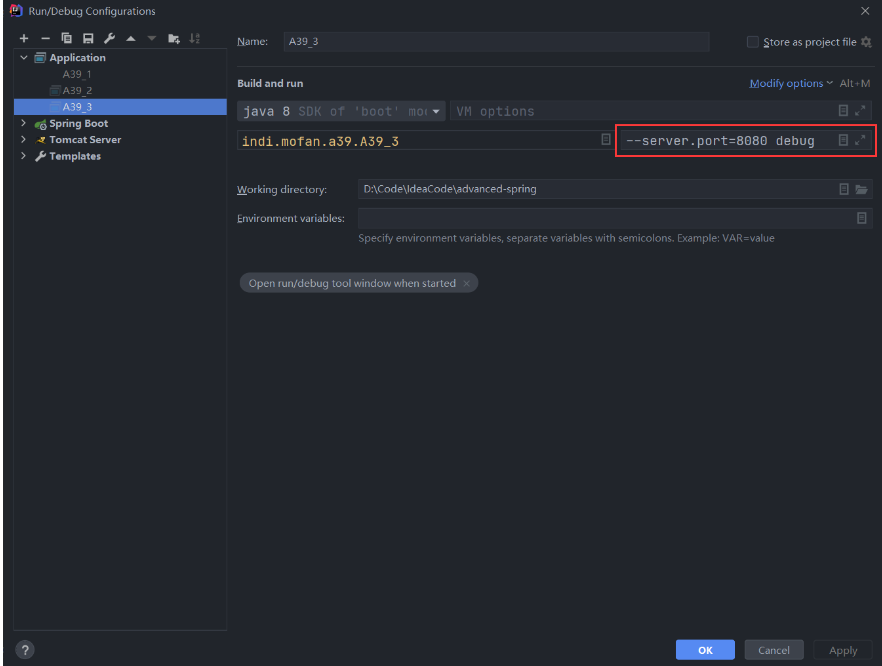
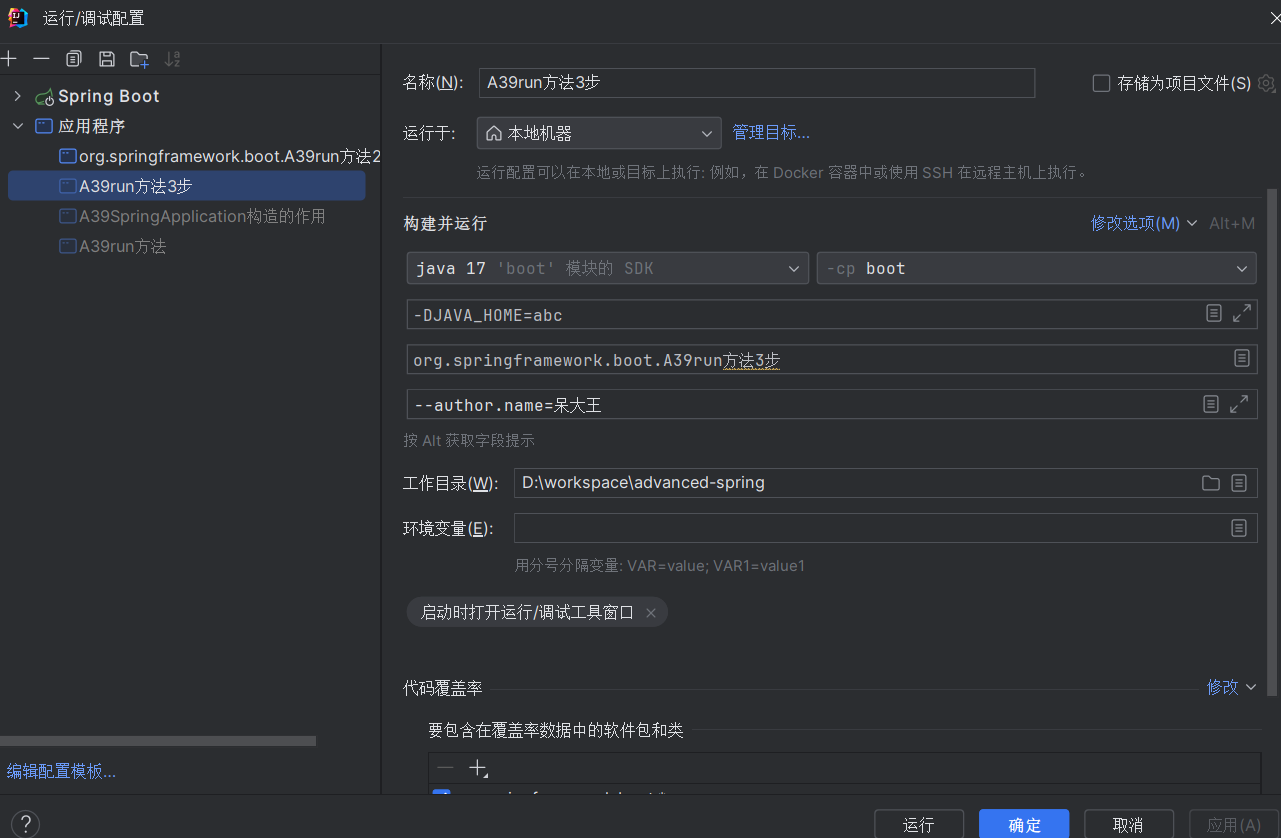
在运行 main 方法时,添加程序参数 --server.port=8080 debug:
1 2 3 4 5 6 >>>>>>>>>>>>>>>>>>>>>>>> 12. 执行 runner ApplicationRunner........[--server.port=8081, DEBUG] [server.port] [8081] [DEBUG] CommandLineRunner........[--server.port=8081, DEBUG]
第三步 准备 Environment 添加命令行参数 Environment环境对象,是对配置信息的抽象
配置信息来源可以是:系统环境变量、properties 配置文件、yaml 配置文件等.
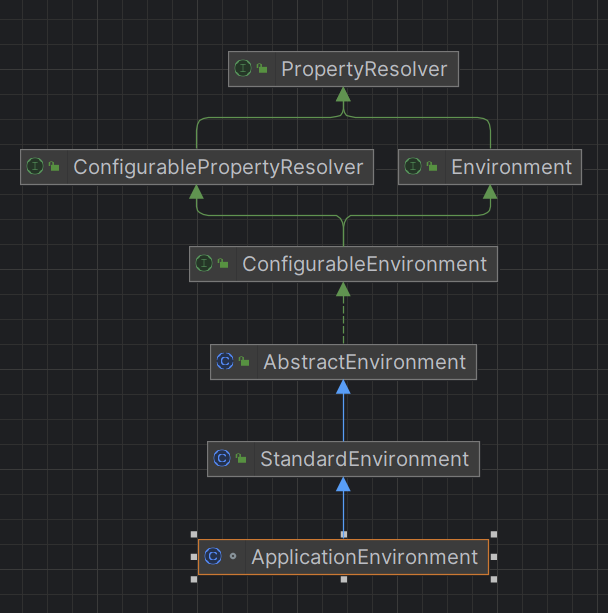
SpringBoot 提供了名为 ApplicationEnvironment 的类表示环境对象
默认情况下,创建的 ApplictionEnvironment对象中配置信息的来源只有两个:
1 2 3 4 5 6 public class Step3 { public static void main (String[] args) { ApplicationEnvironment env = new ApplicationEnvironment (); env.getPropertySources().forEach(System.out::println); } }
1 2 PropertiesPropertySource {name='systemProperties'} SystemEnvironmentPropertySource {name='systemEnvironment'}
针对相同名称的配置信息,按照来源的先后顺序获取.
获取虚拟机参数 获取 JAVA_HOME 的配置信息:
1 2 3 4 public static void main (String[] args) { ApplicationEnvironment env = new ApplicationEnvironment (); System.out.println(env.getProperty("JAVA_HOME" )); }
1 D:\software\work\jdk\jdk8\jdk
由于 PropertiesPropertySource 中并不存在名为 JAVA_HOME 的配置信息
所以从 SystemEnvironmentPropertySource 中获取 JAVA_HOME 的配置信息。
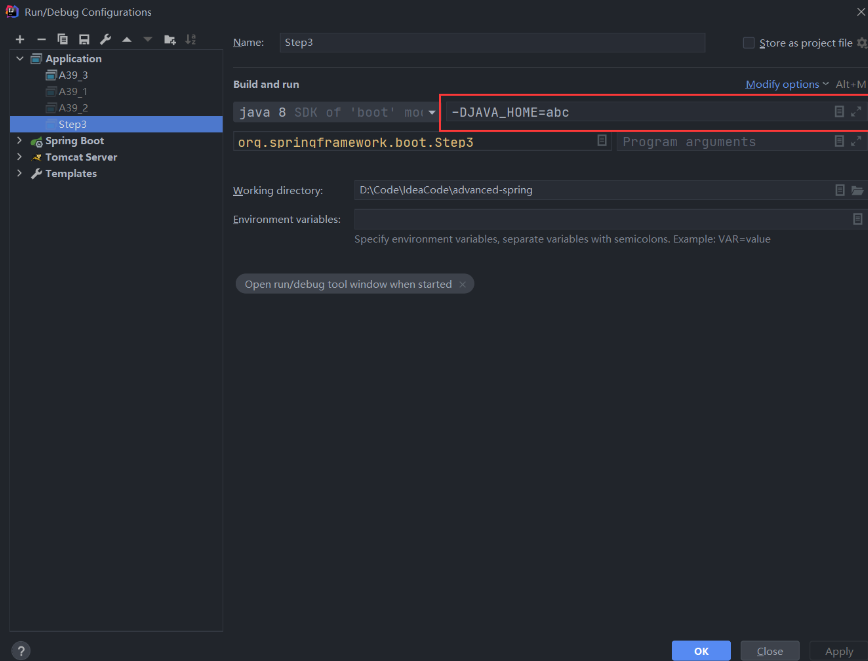
获取命令行参数 在 IDEA 的 Run/Debug Configurations 中的 VM options 添加 -DJAVA_HOME=abc,
使得 PropertiesPropertySource 中存在名为 JAVA_HOME 的配置信息:
获取properties 配置文件信息 如果要从配置文件 application.properties 中读取配置信息,可以添加配置信息的来源。配置文件的优先级最低,添加来源时调用 addLast() 方法:
1 2 3 4 5 6 7 8 @SneakyThrows public static void main (String[] args) { ApplicationEnvironment env = new ApplicationEnvironment (); env.getPropertySources().addLast(new ResourcePropertySource (new ClassPathResource ("application.properties" ))); env.getPropertySources().forEach(System.out::println); System.out.println(env.getProperty("author.name" )); }
1 2 3 4 5 PropertiesPropertySource {name='systemProperties'} SystemEnvironmentPropertySource {name='systemEnvironment'} ResourcePropertySource {name='class path resource [application.properties]'} abc daidawang
获取系统环境变量 在 SpringBoot 中,这里 **只 **添加 SimpleCommandLinePropertSource
并且它的优先级最高,使用 addFirst() 方法添加:
1 2 3 4 5 6 7 8 9 @SneakyThrows public static void main (String[] args) { ApplicationEnvironment env = new ApplicationEnvironment (); env.getPropertySources().addLast(new ResourcePropertySource (new ClassPathResource ("application.properties" ))); env.getPropertySources().addFirst(new SimpleCommandLinePropertySource (args)); env.getPropertySources().forEach(System.out::println); System.out.println(env.getProperty("author.name" )); }
添加程序参数 --author.name=呆大王
1 2 3 4 5 6 SimpleCommandLinePropertySource {name='commandLineArgs'} PropertiesPropertySource {name='systemProperties'} SystemEnvironmentPropertySource {name='systemEnvironment'} ResourcePropertySource {name='class path resource [application.properties]'} abc 呆大王
第四步 添加 ConfigurationPropertySources 创建 step4.properties 文件,内容如下:
1 2 3 user.first-name=dai user.middle_name=da user.lastName=wang
读取文件内容:
1 2 3 4 5 6 7 8 9 10 11 @SneakyThrows public static void main (String[] args) { ApplicationEnvironment env = new ApplicationEnvironment (); env.getPropertySources().addLast( new ResourcePropertySource ("step4" , new ClassPathResource ("step4.properties" )) ); env.getPropertySources().forEach(System.out::println); System.out.println(env.getProperty("user.first-name" )); System.out.println(env.getProperty("user.middle-name" )); System.out.println(env.getProperty("user.last-name" )); }
step4.properties 文件中配置信息的 key 是 user.middle_name,但在读取时,使用的是 user.middle-name;还有 user.lastName 的 key,但读取时使用 user.last-name。能读取成功吗?
1 2 3 4 5 6 PropertiesPropertySource {name='systemProperties'} SystemEnvironmentPropertySource {name='systemEnvironment'} ResourcePropertySource {name='step4'} George null null
显然是不行的,为了能读取成功,需要实现 松散绑定 ,添加 ConfigurationPropertySources:
1 2 3 4 5 6 @SneakyThrows public static void main (String[] args) { ConfigurationPropertySources.attach(env); }
1 2 3 4 5 6 7 ConfigurationPropertySourcesPropertySource {name='configurationProperties'} PropertiesPropertySource {name='systemProperties'} SystemEnvironmentPropertySource {name='systemEnvironment'} ResourcePropertySource {name='step4'} dai da wang
第五步 使用EnvironmentPostProcessorApplicationListener 进行环境对象后置处理 在第三步中 只 添加 SimpleCommandLinePropertySource 读取系统属性和系统变量,
而 读取 properties、YAML 配置文件的源就是在第五步中添加的。
完成这样功能需要使用到 EnvironmentPostProcessor,其具体实现是 ConfigDataEnvironmentPostProcessor。
1 2 3 4 5 6 7 8 9 10 11 12 13 14 15 16 17 18 19 public static void main (String[] args) { SpringApplication app = new SpringApplication (); ApplicationEnvironment env = new ApplicationEnvironment (); System.out.println(">>>>>>>>>>>>>>>>>>>>>>>> 增强前" ); env.getPropertySources().forEach(System.out::println); ConfigDataEnvironmentPostProcessor processor1 = new ConfigDataEnvironmentPostProcessor ( new DeferredLogs (), new DefaultBootstrapContext () ); processor1.postProcessEnvironment(env, app); System.out.println(">>>>>>>>>>>>>>>>>>>>>>>> 增强后" ); env.getPropertySources().forEach(System.out::println); System.out.println(env.getProperty("author.name" )); RandomValuePropertySourceEnvironmentPostProcessor processor2 = new RandomValuePropertySourceEnvironmentPostProcessor (new DeferredLog ()); processor2.postProcessEnvironment(env, app); }
1 2 3 4 5 6 7 8 >>>>>>>>>>>>>>>>>>>>>>>> 增强前 PropertiesPropertySource {name='systemProperties'} SystemEnvironmentPropertySource {name='systemEnvironment'} >>>>>>>>>>>>>>>>>>>>>>>> 增强后 PropertiesPropertySource {name='systemProperties'} SystemEnvironmentPropertySource {name='systemEnvironment'} OriginTrackedMapPropertySource {name='Config resource 'class path resource [application.properties]' via location 'optional:classpath:/''} "daidawang"
EnvironmentPostProcessor 还有一个有趣的实现:RandomValuePropertySourceEnvironmentPostProcessor,该实现提供了随机值的生成。
1 2 3 4 5 6 7 8 9 public static void main (String[] args) { System.out.println(">>>>>>>>>>>>>>>>>>>>>>>> 再次增强后" ); env.getPropertySources().forEach(System.out::println); System.out.println(env.getProperty("random.string" )); System.out.println(env.getProperty("random.int" )); System.out.println(env.getProperty("random.uuid" )); }
1 2 3 4 5 6 7 8 >>>>>>>>>>>>>>>>>>>>>>>> 再次增强后 PropertiesPropertySource {name='systemProperties'} SystemEnvironmentPropertySource {name='systemEnvironment'} RandomValuePropertySource {name='random'} OriginTrackedMapPropertySource {name='Config resource 'class path resource [application.properties]' via location 'optional:classpath:/''} 5ef4038a709215938cbd3e1c031f66dd 1481116109 18548e0b-8bad-458b-b38e-bf793aa24ced
在 SpringBoot 中实现不是上述代码的方式添加后置处理器的,
同样会从 META-INF/spring.factories 配置文件读取并初始化处理器:
1 2 3 4 5 6 7 8 # Environment Post Processors org.springframework.boot.env.EnvironmentPostProcessor=\ org.springframework.boot.cloud.CloudFoundryVcapEnvironmentPostProcessor,\ org.springframework.boot.context.config.ConfigDataEnvironmentPostProcessor,\ org.springframework.boot.env.RandomValuePropertySourceEnvironmentPostProcessor,\ org.springframework.boot.env.SpringApplicationJsonEnvironmentPostProcessor,\ org.springframework.boot.env.SystemEnvironmentPropertySourceEnvironmentPostProcessor,\ org.springframework.boot.reactor.DebugAgentEnvironmentPostProcessor
SpringBoot 读取 META-INF/spring.factories 配置文件初始化环境后置处理器,再执行处理逻辑由
EnvironmentPostProcessorApplicationListener 完成.
它是事件监听器,同样在META-INF/spring.factories 配置文件中读取并初始化:
1 2 3 4 5 6 7 8 9 org.springframework.context.ApplicationListener=\ org.springframework.boot.ClearCachesApplicationListener,\ org.springframework.boot.builder.ParentContextCloserApplicationListener,\ org.springframework.boot.context.FileEncodingApplicationListener,\ org.springframework.boot.context.config.AnsiOutputApplicationListener,\ org.springframework.boot.context.config.DelegatingApplicationListener,\ org.springframework.boot.context.logging.LoggingApplicationListener,\ org.springframework.boot.env.EnvironmentPostProcessorApplicationListener\
要想该监听器成功监听到事件,需要第五步发布一个事件,而事件的发布由第一步获取的事件发布器完成
1 2 3 4 5 6 7 8 9 10 11 12 13 14 15 public static void main (String[] args) { SpringApplication app = new SpringApplication (); app.addListeners(new EnvironmentPostProcessorApplicationListener ()); ApplicationEnvironment env = new ApplicationEnvironment (); List<String> names = SpringFactoriesLoader.loadFactoryNames(EnvironmentPostProcessor.class, Step5.class.getClassLoader()); names.forEach(System.out::println); EventPublishingRunListener publisher = new EventPublishingRunListener (app, args); System.out.println(">>>>>>>>>>>>>>>>>>>>>>>> 增强前" ); env.getPropertySources().forEach(System.out::println); publisher.environmentPrepared(new DefaultBootstrapContext (), env); System.out.println(">>>>>>>>>>>>>>>>>>>>>>>> 增强后" ); env.getPropertySources().forEach(System.out::println); }
1 2 3 4 5 6 7 8 9 10 11 12 13 14 15 org.springframework.boot.cloud.CloudFoundryVcapEnvironmentPostProcessor org.springframework.boot.context.config.ConfigDataEnvironmentPostProcessor org.springframework.boot.env.RandomValuePropertySourceEnvironmentPostProcessor org.springframework.boot.env.SpringApplicationJsonEnvironmentPostProcessor org.springframework.boot.env.SystemEnvironmentPropertySourceEnvironmentPostProcessor org.springframework.boot.reactor.DebugAgentEnvironmentPostProcessor org.springframework.boot.autoconfigure.integration.IntegrationPropertiesEnvironmentPostProcessor >>>>>>>>>>>>>>>>>>>>>>>> 增强前 PropertiesPropertySource {name='systemProperties'} SystemEnvironmentPropertySource {name='systemEnvironment'} >>>>>>>>>>>>>>>>>>>>>>>> 增强后 PropertiesPropertySource {name='systemProperties'} OriginAwareSystemEnvironmentPropertySource {name='systemEnvironment'} RandomValuePropertySource {name='random'} OriginTrackedMapPropertySource {name='Config resource 'class path resource [application.properties]' via location 'optional:classpath:/''}
配置文件 EnvironmentPostProcessor 实现有很多,但是上述打印的信息生效的不多,是否生效于项目的依赖配置无关.
第六步 绑定配置信息到 SpringApplication @ConfigurationProperties 注解的原理 使用 @ConfigurationProperties 注解可以指定一个前缀,SpringBoot 将根据指定的前缀和属性名称在配置文件中寻找对应的信息并完成注入,其底层是利用 Binder 实现的。
1 2 3 4 5 6 7 8 9 10 11 12 13 14 15 16 17 18 19 20 public class A39ConfigurationProperties 原理 { public static void main (String[] args) throws IOException { ApplicationEnvironment applicationEnvironment = new ApplicationEnvironment (); applicationEnvironment.getPropertySources() .addLast(new ResourcePropertySource ("step4" ,new ClassPathResource ("step4.properties" ))); User user = Binder.get(applicationEnvironment).bind("user" , User.class).get(); System.out.println(user); User user1 = new User (); Binder.get(applicationEnvironment).bind("user" , Bindable.ofInstance(user1)); System.out.println(user1); } @Data static class User { private String lastName; private String middleName; private String firstName; } }
step4.properties :
1 2 3 user.first-name =dai user.middle_name =da user.lastName =wang
1 2 A39ConfigurationProperties原理.User(lastName=wang, middleName=da, firstName=dai) A39ConfigurationProperties原理.User(lastName=wang, middleName=da, firstName=dai)
绑定配置信息到 SpringApplication 在第六步中,绑定 spring.main 前缀的配置信息到 SpringApplication 对象也是利用了 Binder。
假设 step6.properties 配置文件的信息如下:
1 2 spring.main.banner-mode =off spring.main.lazy-initialization =true
1 2 3 4 5 6 7 8 9 10 11 12 13 14 15 16 17 18 19 20 21 22 23 24 25 26 27 28 29 30 31 32 33 public class A39run 方法6 步 { public static void main (String[] args) throws IOException, IllegalAccessException, NoSuchFieldException { ApplicationEnvironment applicationEnvironment = new ApplicationEnvironment (); applicationEnvironment.getPropertySources() .addLast(new ResourcePropertySource ("step6" ,new ClassPathResource ("step6.properties" ))); SpringApplication application = new SpringApplication (); Class<? extends SpringApplication > clazz = application.getClass(); Field bannerMode = clazz.getDeclaredField("bannerMode" ); bannerMode.setAccessible(Boolean.TRUE); Field lazyInitialization = clazz.getDeclaredField("lazyInitialization" ); lazyInitialization.setAccessible(Boolean.TRUE); System.out.println(bannerMode.get(application)); System.out.println(lazyInitialization.get(application)); Binder.get(applicationEnvironment).bind("spring.main" , Bindable.ofInstance(application)); System.out.println(bannerMode.get(application)); System.out.println(lazyInitialization.get(application)); } }
第七步 打印 Banner 1 2 3 4 5 6 7 8 9 10 11 12 13 14 15 16 17 public class A39run 方法7 步 { public static void main (String[] args) { ApplicationEnvironment applicationEnvironment = new ApplicationEnvironment (); SpringApplicationBannerPrinter springApplicationBannerPrinter = new SpringApplicationBannerPrinter ( new DefaultResourceLoader (), new SpringBootBanner () ); printer.print(env, A39run方法7 步.class, System.out); } }
除此之外还可以自定义文字和图片 Banner,文字 Banner 的文件类型需要是 txt,图片 Banner 的文件类型需要是 gif。
文字:
1 2 3 4 5 6 7 8 9 10 public static void main (String[] args) { env.getPropertySources().addLast(new MapPropertySource ( "custom" , Collections.singletonMap("spring.banner.location" , "banner1.txt" ) )); printer.print(env, A39run方法7 步.class, System.out); }
文字 Banner 可以从 网站 上自定义.
获取 Spring 或 SpringBoot 的版本号可以使用:
1 2 System.out.println("SpringBoot: " + SpringBootVersion.getVersion()); System.out.println("Spring: " + SpringVersion.getVersion());
步骤总结
得到 SpringApplicationRunListeners 事件发布器
将 main 方法的参数 封装ApplicationArguments 对象(此对象将参数分为两类a选项参数 –开头.可添加到命令行 b非选项参数)
准备 environment 并添加选项参数(命令行参数)
松绑定 , ConfigurationPropertySources 处理
发布 environmentPrepared 事件 ,表示environment已经准备 2️⃣
通过spring.factories 里找到事件监听器 EnvironmentPostProcessorApplicationListener , 调用environmentPrepared 方法增强environment,例如随机数的源和读取 application.properties 的源
绑定 spring.main 前缀的 key 到 SpringApplication 对象
打印 Banner
创建容器
准备容器,应用初始化器增强 ApplicationContext
发布 contextPrepared 事件,表示容器创建好并调用初始化器 3️⃣
获取所有 BeanDefinition 源(xml、配置类、组件扫描) , 加载 BeanDefinition 到 ApplicationContext 容器
refresh 容器,调用 Bean 工厂后置处理器 、bean 后置处理器、初始化单例 bean
发布 started 事件,表示 ApplicationContext 准备好了 5️⃣
调用实现 ApplicationRunner 或者 CommandLineRunner 的 bean
发布 running 事件 6️⃣
这其中有异常,发布 Application Failed 事件 7️⃣
步骤对应的代码:
1 2 3 4 5 6 7 8 9 10 11 12 13 14 15 16 17 18 19 20 21 22 23 24 25 26 27 28 29 30 31 32 33 34 35 36 37 38 39 40 41 42 43 44 45 46 47 48 49 50 51 public ConfigurableApplicationContext run (String... args) { long startTime = System.nanoTime(); DefaultBootstrapContext bootstrapContext = createBootstrapContext(); ConfigurableApplicationContext context = null ; configureHeadlessProperty(); SpringApplicationRunListeners listeners = getRunListeners(args); listeners.starting(bootstrapContext, this .mainApplicationClass); try { ApplicationArguments applicationArguments = new DefaultApplicationArguments (args); ConfigurableEnvironment environment = prepareEnvironment(listeners, bootstrapContext, applicationArguments); configureIgnoreBeanInfo(environment); Banner printedBanner = printBanner(environment); context = createApplicationContext(); context.setApplicationStartup(this .applicationStartup); prepareContext(bootstrapContext, context, environment, listeners, applicationArguments, printedBanner); refreshContext(context); afterRefresh(context, applicationArguments); Duration timeTakenToStartup = Duration.ofNanos(System.nanoTime() - startTime); if (this .logStartupInfo) { new StartupInfoLogger (this .mainApplicationClass).logStarted(getApplicationLog(), timeTakenToStartup); } listeners.started(context, timeTakenToStartup); callRunners(context, applicationArguments); } catch (Throwable ex) { handleRunFailure(context, ex, listeners); throw new IllegalStateException (ex); } try { Duration timeTakenToReady = Duration.ofNanos(System.nanoTime() - startTime); listeners.ready(context, timeTakenToReady); } catch (Throwable ex) { handleRunFailure(context, ex, null ); throw new IllegalStateException (ex); } return context; }
1 2 3 4 5 6 7 8 9 10 11 12 13 14 15 16 17 18 19 20 21 22 23 24 25 private ConfigurableEnvironment prepareEnvironment (SpringApplicationRunListeners listeners, DefaultBootstrapContext bootstrapContext, ApplicationArguments applicationArguments) { ConfigurableEnvironment environment = getOrCreateEnvironment(); configureEnvironment(environment, applicationArguments.getSourceArgs()); ConfigurationPropertySources.attach(environment); listeners.environmentPrepared(bootstrapContext, environment); DefaultPropertiesPropertySource.moveToEnd(environment); Assert.state(!environment.containsProperty("spring.main.environment-prefix" ), "Environment prefix cannot be set via properties." ); bindToSpringApplication(environment); if (!this .isCustomEnvironment) { EnvironmentConverter environmentConverter = new EnvironmentConverter (getClassLoader()); environment = environmentConverter.convertEnvironmentIfNecessary(environment, deduceEnvironmentClass()); } ConfigurationPropertySources.attach(environment); return environment; }
1 2 3 4 5 6 7 8 9 10 11 12 13 14 15 16 17 18 19 20 21 22 23 24 25 26 27 28 29 30 31 32 33 34 35 36 37 38 private void prepareContext (DefaultBootstrapContext bootstrapContext, ConfigurableApplicationContext context, ConfigurableEnvironment environment, SpringApplicationRunListeners listeners, ApplicationArguments applicationArguments, Banner printedBanner) { context.setEnvironment(environment); postProcessApplicationContext(context); applyInitializers(context); listeners.contextPrepared(context); bootstrapContext.close(context); if (this .logStartupInfo) { logStartupInfo(context.getParent() == null ); logStartupProfileInfo(context); } ConfigurableListableBeanFactory beanFactory = context.getBeanFactory(); beanFactory.registerSingleton("springApplicationArguments" , applicationArguments); if (printedBanner != null ) { beanFactory.registerSingleton("springBootBanner" , printedBanner); } if (beanFactory instanceof AbstractAutowireCapableBeanFactory) { ((AbstractAutowireCapableBeanFactory) beanFactory).setAllowCircularReferences(this .allowCircularReferences); if (beanFactory instanceof DefaultListableBeanFactory) { ((DefaultListableBeanFactory) beanFactory) .setAllowBeanDefinitionOverriding(this .allowBeanDefinitionOverriding); } } if (this .lazyInitialization) { context.addBeanFactoryPostProcessor(new LazyInitializationBeanFactoryPostProcessor ()); } context.addBeanFactoryPostProcessor(new SpringApplication .PropertySourceOrderingBeanFactoryPostProcessor(context)); Set<Object> sources = getAllSources(); Assert.notEmpty(sources, "Sources must not be empty" ); load(context, sources.toArray(new Object [0 ])); listeners.contextLoaded(context); }
40.Tomcat 内嵌容器 41.自动配置 41.1 自动配置原理 创建以下类:
1 2 3 4 5 6 7 8 9 10 11 12 13 14 15 16 17 18 19 20 21 22 23 24 25 26 27 28 static class AutoConfiguration1 { @Bean public Bean1 bean1 () { return new Bean1 (); } } @ToString @NoArgsConstructor @AllArgsConstructor static class Bean1 { private String name; } static class AutoConfiguration2 { @Bean public Bean2 bean2 () { return new Bean2 (); } } static class Bean2 { }
其中 AutoConfiguration1 和 AutoConfiguration2 用来模拟第三方配置类,注意它们并没有被 @Configuration 注解标记,因此在未进行其他操作时,不会被添加到 Spring 容器中。
然后编写自己的配置类,使用 @Import 注解将第三方配置类添加到 Spring 容器中:
1 2 3 4 5 6 @Configuration @Import({AutoConfiguration1.class,AutoConfiguration2.class}) static class Config {}
1 2 3 4 5 6 7 8 9 10 11 public static void main (String[] args) { GenericApplicationContext context = new GenericApplicationContext (); context.registerBean("config" ,Config.class); context.registerBean(ConfigurationClassPostProcessor.class); context.refresh(); for (String beanDefinitionName : context.getBeanDefinitionNames()) { System.out.println(beanDefinitionName); } }
1 2 3 4 5 6 myAutoConfiguration org.springframework.context.annotation.ConfigurationClassPostProcessor org.springframework.boot.A41自动装配.A41$AutoConfiguration1 bean1 org.springframework.boot.A41自动装配.A41$AutoConfiguration2 bean2
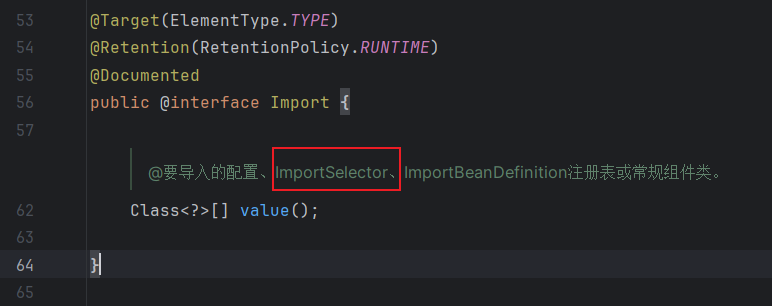
@Improt 的 ImportSelector 如果有多个第三方配置类,难不成到一个个地导入?
点击进入 @Import
可以使用 ImportSelector,获取需要自动装配的 Bean 的全限定类名数组:
1 2 3 4 5 6 7 8 9 10 11 12 13 14 15 16 17 @Configuration @Import(MyImportSelector.class) static class Config {} static class MyImportSelector implements ImportSelector { @Override public String[] selectImports(AnnotationMetadata importingClassMetadata) { return new String []{ AutoConfiguration1.class.getName(),AutoConfiguration2.class.getName() }; } }
如果 selectImports() 方法返回的全限定类名可以从文件中读取,就更方便了。
在当前项目的类路径下创建 META-INF/spring.factories 文件,约定一个 key,对应的 value 即为需要指定装配的 Bean:
1 2 3 4 5 org.springframework.boot.A41自动装配.A41$MyImportSelector =\ org.springframework.boot.A41自动装配.A41.AutoConfiguration1,\ org.springframework.boot.A41自动装配.A41.AutoConfiguration2
修改 ImportSelector 的实现类:
1 2 3 4 5 6 7 8 9 10 11 12 13 static class MyImportSelector implements ImportSelector { @Override public String[] selectImports(AnnotationMetadata importingClassMetadata) { List<String> names = SpringFactoriesLoader.loadFactoryNames( MyImportSelector.class, null ); return names.toArray(new String [0 ]); } }
运行 main() 方法后,控制台打印出同样的结果。
SpringFactoriesLoader.loadFactoryNames() 不仅只扫描当前项目类型路径下
的 META-INF/spring.factories 文件,
而是会扫描包括 Jar 包里类路径下的 META-INF/spring.factories 文件。
针对 SpringBoot 来说,自动装配的 Bean 使用以下语句加载:
1 SpringFactoriesLoader.loadFactoryNames(EnableAutoConfiguration.class, null );
SpringBoot2.7 及其以后版本的自动装配 在 SpringBoot2.7 及其以后版本,SpringBoot 不在读取 META-INF/spring.factories文件中的 key
为 org.springframework.boot.autoconfigure.EnableAutoConfiguration的 values 来实现自动装配.
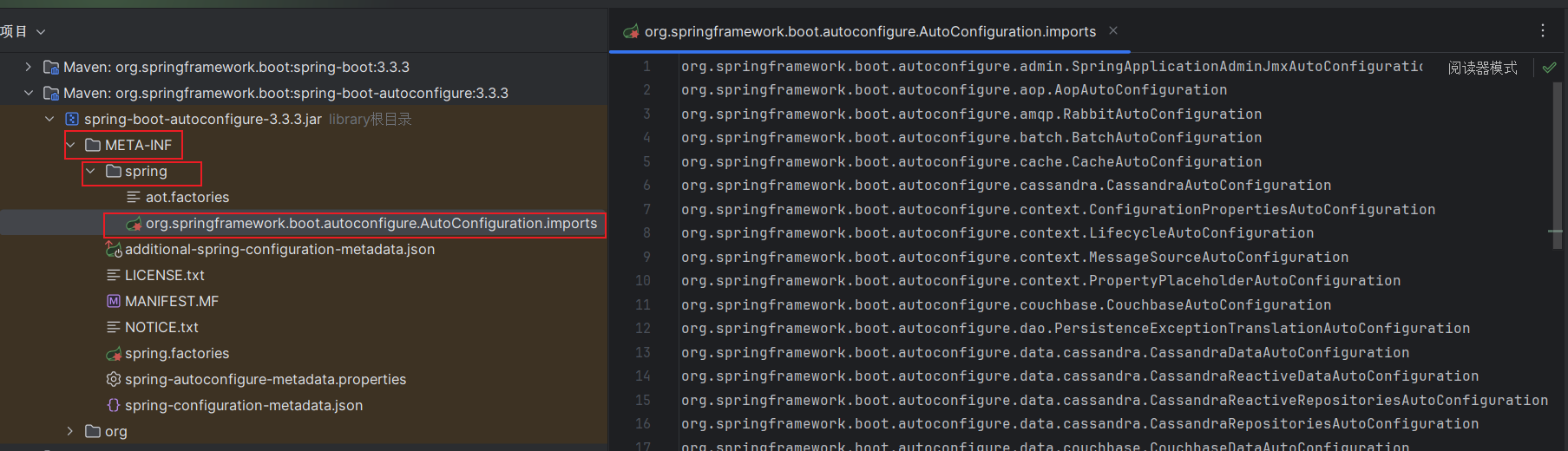
为了更贴合 SPI 机制,SpringBoot 将读取 META-INF/spring/org.springframework.boot.autoconfigure.AutoConfiguration.imports文件中的内容,
该文件每一行都表示需要自动装配的 Bean 的全限定类名,可以使用 #作为注释,其加载方式使用:
1 ImportCandidates.load(AutoConfiguration.class, getBeanClassLoader());
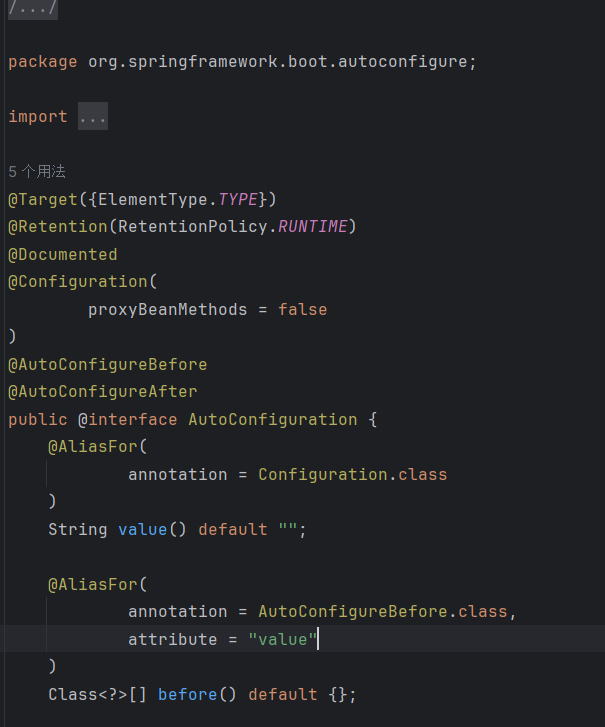
其中 AutoConfiguration是一个注解,全限定类名为 <font style="background-color:rgba(255, 255, 255, 0);">org.springframework.boot.autoconfigure.AutoConfiguration</font>
也就是说可以自定义注解,创建自定义 META-INF/spring/full-qualified-annotation-name.imports文件,
在文件里声明需要自动装配的类:
1 2 3 4 5 6 7 8 9 10 11 12 13 14 15 16 17 18 package dai.dawang.a41;import java.lang.annotation.ElementType;import java.lang.annotation.Retention;import java.lang.annotation.RetentionPolicy;import java.lang.annotation.Target;@Target(ElementType.TYPE) @Retention(RetentionPolicy.RUNTIME) public @interface MyAutoConfiguration {}
1 2 3 4 5 public class A41 { static class Bean3 { } }
创建 META-INF/spring/indi.mofan.a41.MyAutoConfiguration.imports 文件:
1 dai.dawang.a41.A41$Bean3
修改 selectImports() 方法实现逻辑:
1 2 3 4 5 6 7 8 9 10 11 12 13 14 15 16 17 18 19 20 21 22 23 24 25 26 27 28 29 30 31 32 33 34 35 36 @Configuration @Import(MyImportSelector.class) static class Config { @Bean public Bean1 bean1 () { return new Bean1 ("本项目" ); } } static class MyImportSelector implements ImportSelector { @Override public String[] selectImports(AnnotationMetadata importingClassMetadata) { List<String> names = SpringFactoriesLoader.loadFactoryNames(MyImportSelector.class, null ); System.out.println(">>>>>>>>>>>>>>>>>>>>>>>>>>>>>>>>>>>>>>>>>>>>>>>>>>" ); SpringFactoriesLoader.loadFactoryNames(EnableAutoConfiguration.class, null ).stream().forEach(System.out::println); System.out.println(">>>>>>>>>>>>>>>>>>>>>>>>>>>>>>>>>>>>>>>>>>>>>>>>>>" ); ImportCandidates load = ImportCandidates.load(MyAutoConfiguration.class, MyAutoConfiguration.class.getClassLoader()); names = new ArrayList <>(names); load.forEach(names::add); return names.toArray(new String [0 ]); } }
运行 main() 方法后,Spring 容器中的 Bean 多了 一个:
1 dai.dawang.a41.A41$Bean3
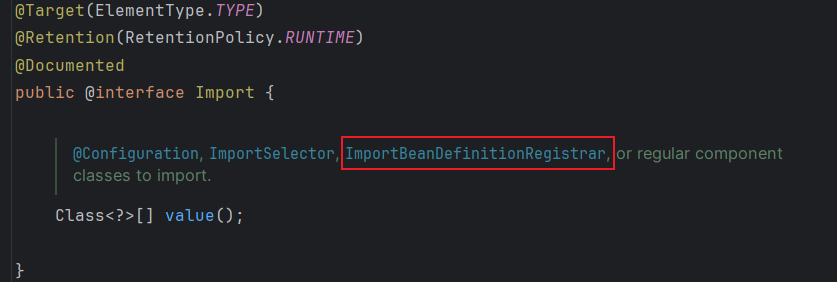
补充 @Import 的@Improt 的 ImportBeanDefinitionRegistrar
我们刚刚了解的 @Import 的 ImportSelector 属性和 实现类 <font style="background-color:rgba(255, 255, 255, 0);">DeferredImportSelector</font>
定义了冲突的 Bean 第三方装配了 Bean1:
1 2 3 4 5 6 7 8 9 static class AutoConfiguration1 { @Bean public Bean1 bean1 () { return new Bean1 ("第三方" ); } }
用户又自行定义了 Bean1:
1 2 3 4 5 6 7 8 9 10 11 12 13 14 15 @Configuration @Import(MyImportSelector.class) static class Config { @Bean public Bean1 bean1 () { return new Bean1 ("本项目" ); } }
修改测试的 main() 方法:
1 2 3 4 5 6 7 8 9 10 11 12 13 14 15 16 17 18 19 public static void main (String[] args) { GenericApplicationContext context = new GenericApplicationContext (); context.registerBean("config" , Config.class); context.registerBean(ConfigurationClassPostProcessor.class); context.refresh(); System.out.println(context.getBean("bean1" , Bean1.class)); Arrays.stream(context.getBeanDefinitionNames()).forEach(System.out::println); }
用户自行定义的 Bean 生效了,这是因为:@Import 导入的 Bean 先于配置类中 @Bean 定义的 Bean 执行,后者覆盖前者 ,使得用户自定义的 Bean 生效。
但在 SpringBoot 中不是这样的,当后续添加的 Bean 想覆盖先前添加的 Bean,会出现错误。模拟 SpringBoot 的设置:
1 2 3 4 5 6 7 public static void main (String[] args) { GenericApplicationContext context = new GenericApplicationContext (); context.getDefaultListableBeanFactory().setAllowBeanDefinitionOverriding(false ); }
1 Exception in thread "main" org.springframework.beans.factory.support.BeanDefinitionOverrideException: Invalid bean definition with name 'bean1' defined in dai.dawang.a41.A41$Config: Cannot register bean definition [Root bean: class [null ]; scope=; abstract =false ; lazyInit=null ; autowireMode=3 ; dependencyCheck=0 ; autowireCandidate=true ; primary=false ; factoryBeanName=config; factoryMethodName=bean1; initMethodNames=null ; destroyMethodNames=[(inferred)]; defined in dai.dawang.a41.A41$Config] for bean 'bean1' since there is already [Root bean: class [null ]; scope=; abstract =false ; lazyInit=null ; autowireMode=3 ; dependencyCheck=0 ; autowireCandidate=true ; primary=false ; factoryBeanName=dai.dawang.a41.A41$AutoConfiguration1; factoryMethodName=bean1; initMethodNames=null ; destroyMethodNames=[(inferred)]; defined in class path resource [dai/dawang/a41/A41$AutoConfiguration1.class]] bound.
那这样是合理的吗?
显然不是。比如 SpringBoot 默认的数据连接池是 Hikari,如果用户想换成 Druid,岂不是做不到?
实际情况下是能做到的,这又是怎么做到的呢?
首先需要使用户的配置类中定义的 Bean 先于 @Import 导入的 Bean 添加到 Spring 容器中,
只需将选择器 MyImportSelector 实现的 ImportSelector 接口更换成其子接口 DeferredImportSelector 即可:
1 2 3 static class MyImportSelector implements DeferredImportSelector { }
1 Exception in thread "main" org.springframework.beans.factory.support.BeanDefinitionOverrideException: Invalid bean definition with name 'bean1' defined in class path resource [dai/dawang/a41/A41$AutoConfiguration1.class]: Cannot register bean definition [Root bean: class [null ]; scope=; abstract =false ; lazyInit=null ; autowireMode=3 ; dependencyCheck=0 ; autowireCandidate=true ; primary=false ; factoryBeanName=dai.dawang.a41.A41$AutoConfiguration1; factoryMethodName=bean1; initMethodNames=null ; destroyMethodNames=[(inferred)]; defined in class path resource [dai/dawang/a41/A41$AutoConfiguration1.class]] for bean 'bean1' since there is already [Root bean: class [null ]; scope=; abstract =false ; lazyInit=null ; autowireMode=3 ; dependencyCheck=0 ; autowireCandidate=true ; primary=false ; factoryBeanName=config; factoryMethodName=bean1; initMethodNames=null ; destroyMethodNames=[(inferred)]; defined in dai.dawang.a41.A41$Config] bound.
尽管还是出现了异常,但异常信息中显示的是在配置类定义的 Bean 已存在,第三方装配的 Bean 无法再添加,这表明 Bean 的添加顺序修改成功。
最后在第三方定义的 Bean 上添加 @ConditionalOnMissingBean 注解,表示容器中存在同名的 Bean 时忽略该 Bean 的添加:
1 2 3 4 5 6 7 8 9 10 static class AutoConfiguration1 { @Bean @ConditionalOnMissingBean public Bean1 bean1 () { return new Bean1 ("第三方" ); } }
那么 <font style="background-color:rgba(255, 255, 255, 0);">ImportBeanDefinitionRegistrar</font>属性如何使用呢?
1 2 3 4 5 6 7 8 9 10 11 12 13 14 15 16 17 18 19 20 21 22 23 24 25 26 27 28 29 30 31 32 33 34 35 36 37 38 39 40 41 42 43 44 45 46 47 48 public class ImportBeanDefinitionRegistrar 属性 { public static void main (String[] args) { GenericApplicationContext context = new GenericApplicationContext (); context.registerBean(ConfigurationClassPostProcessor.class); context.registerBean("config" , Config.class); context.refresh(); Arrays.stream(context.getBeanDefinitionNames()).forEach(System.out::println); System.out.println(context.getBean(User.class)); } @Configuration @Import({MyImportBeanDefinitionRegistrar.class}) static class Config { } static class MyImportBeanDefinitionRegistrar implements ImportBeanDefinitionRegistrar { @Override public void registerBeanDefinitions (AnnotationMetadata importingClassMetadata, BeanDefinitionRegistry registry) { AbstractBeanDefinition beanDefinition = BeanDefinitionBuilder.genericBeanDefinition(User.class) .addPropertyValue("name" , "daidawang" ) .addPropertyValue("age" , 24 ) .getBeanDefinition(); registry.registerBeanDefinition("user" , beanDefinition); } } @Setter @ToString static class User { private String name; private int age; } }
1 2 3 4 org.springframework.context.annotation.ConfigurationClassPostProcessor config user ImportBeanDefinitionRegistrar属性.User(name=daidawng, age=24 )
41.2 Aop 自动配置 <font style="color:#DF2A3F;">AopAutoConfiguration</font>类完成 AOP 自动装配,
<font style="color:#DF2A3F;">AopAutoConfiguration</font>类通过<font style="color:#DF2A3F;">@Conditionalxxx</font>注解的判断后,
都会往 <font style="color:#DF2A3F;">BeanDefinition注册表: BeanDefinitionRegistry </font> 里添加 <font style="color:#DF2A3F;">AnnotationAwareAspectJAutoProxyCreator</font> 的 Bean 完成AOP 自动装配。
确保当前模块导入:
1 2 3 4 <dependency > <groupId > org.springframework.boot</groupId > <artifactId > spring-boot-starter-aop</artifactId > </dependency >
1 2 3 4 5 6 7 8 9 10 11 12 13 14 15 16 17 18 19 20 21 22 23 24 25 26 27 28 29 30 31 32 33 34 35 public class AopAuto { public static void main (String[] args) { GenericApplicationContext context = new GenericApplicationContext (); AnnotationConfigUtils.registerAnnotationConfigProcessors( context.getDefaultListableBeanFactory() ); context.registerBean(Config.class); context.refresh(); Arrays.stream(context.getBeanDefinitionNames()).forEach(System.out::println); } @Configuration @Import(MyImportSelector.class) static class Config {} static class MyImportSelector implements DeferredImportSelector { @Override public String[] selectImports(AnnotationMetadata importingClassMetadata) { return new String []{AopAutoConfiguration.class.getName()}; } } }
1 2 3 4 5 6 7 8 9 10 org.springframework.context.annotation.internalConfigurationAnnotationProcessor org.springframework.context.annotation.internalAutowiredAnnotationProcessor org.springframework.context.annotation.internalCommonAnnotationProcessor org.springframework.context.event.internalEventListenerProcessor org.springframework.context.event.internalEventListenerFactory dai.dawang.a41.aop自动配置.AopAuto$Config org.springframework.boot.autoconfigure.aop.AopAutoConfiguration$AspectJAutoProxyingConfiguration$CglibAutoProxyConfiguration org.springframework.aop.config.internalAutoProxyCreator org.springframework.boot.autoconfigure.aop.AopAutoConfiguration$AspectJAutoProxyingConfiguration org.springframework.boot.autoconfigure.aop.AopAutoConfiguration
打印内容以 ai.dawang.a41.aop自动配置.AopAuto$Config
为分割线,上方是添加的一些后置处理器 ,下方是 AOP 自动装配添加的 Bean
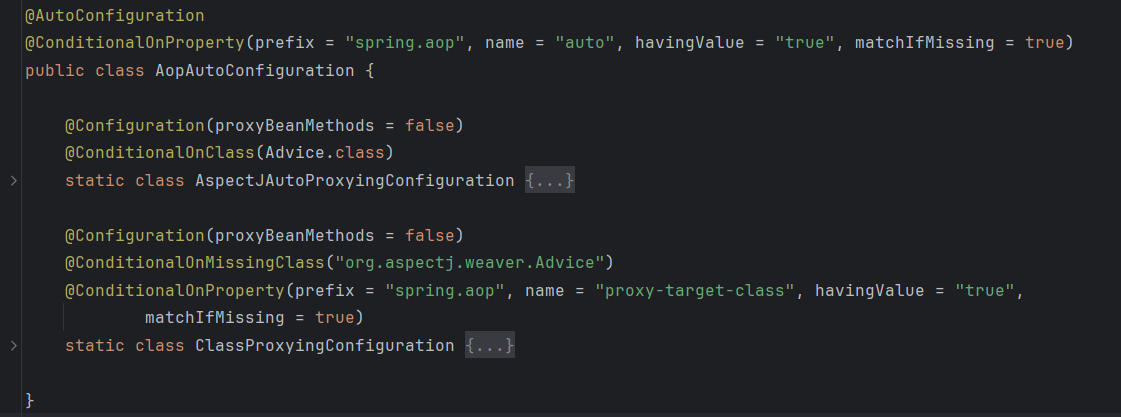
点击进入 AopAutoConfiguration
类上添加注解 <font style="color:#DF2A3F;">@ConditionOnProperty</font>的配置信息: 如果文件中存在 前缀 为 <font style="color:#DF2A3F;">spring.aop</font> ,名称 为 <font style="color:#DF2A3F;">auto</font>的 key,且对应的 value 是 <font style="color:#DF2A3F;">true</font>时,配置类 <font style="color:#DF2A3F;">AopAutoConfiguration</font>生效, 属性 <font style="color:#DF2A3F;">matchIfMissing</font>表示:如果配置文件中未显式配置,该配置类依然生效。
不使用配置文件,使用 <font style="color:#DF2A3F;">StandardEnvironment</font>指定 <font style="color:#DF2A3F;">spring.aop.auto</font>的值为 <font style="color:#DF2A3F;">false</font>:
1 2 3 4 5 6 7 8 9 10 11 public static void main (String[] args) { GenericApplicationContext context = new GenericApplicationContext (); StandardEnvironment environment = new StandardEnvironment (); environment.getPropertySources().addLast(new SimpleCommandLinePropertySource ("--spring.aop.auto=false" )); context.setEnvironment(environment); }}
1 2 3 4 5 6 org.springframework.context.annotation.internalConfigurationAnnotationProcessor org.springframework.context.annotation.internalAutowiredAnnotationProcessor org.springframework.context.annotation.internalCommonAnnotationProcessor org.springframework.context.event.internalEventListenerProcessor org.springframework.context.event.internalEventListenerFactory dai.dawang.a41.aop自动配置.AopAuto$Config
如果 spring.aop.auto 的值是 true,又会成功添加上 AOP 自动装配的 Bean。
再看 AopAutoConfiguration的内部类;
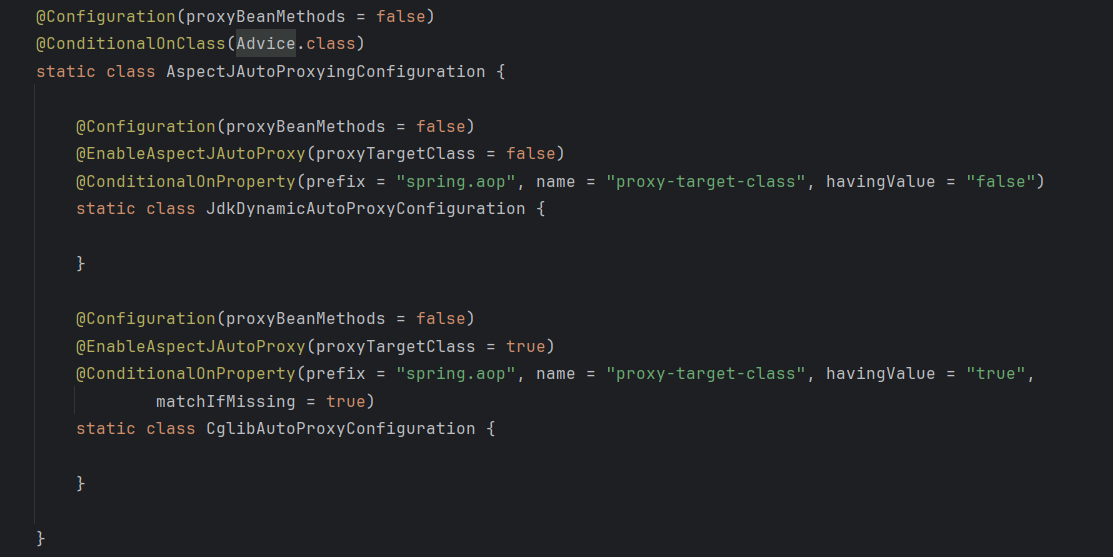
其内部存在两个类:AspectJAutoProxyingConfiguration 和 ClassProxyingConfiguration。
使用了 @ConditionalOnClass 注解判断 Advice.class 存在时,AspectJAutoProxyingConfiguration 生效;
使用 @ConditionalOnMissingClass 注解判断 org.aspectj.weaver.Advice 不存在时,ClassProxyingConfiguration 生效。
由于先前导入了 spring-boot-starter-aop 依赖,Advice.class 是存在的,AspectJAutoProxyingConfiguration 将生效。
AspectJAutoProxyingConfiguration 内部又有两个配置类:
这两个配置类通过使用 @ConditionalOnProperty 注解判断配置文件中是否存在 spring.aop.proxy-target-class 配置来让对应的配置类生效。
由于并未显式配置,因此 CglibAutoProxyConfiguration 将生效。
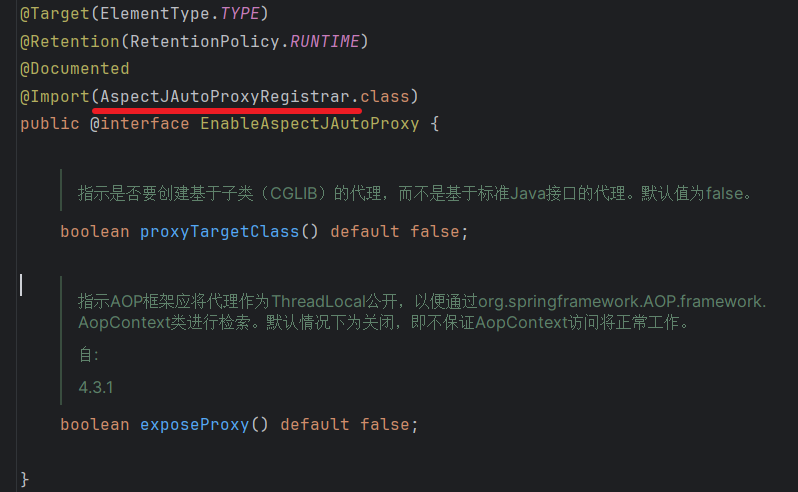
无论哪个配置类生效,它们都被 @EnableAspectJAutoProxy 标记,这个注解相当于是添加了些配置的 @Import 注解:
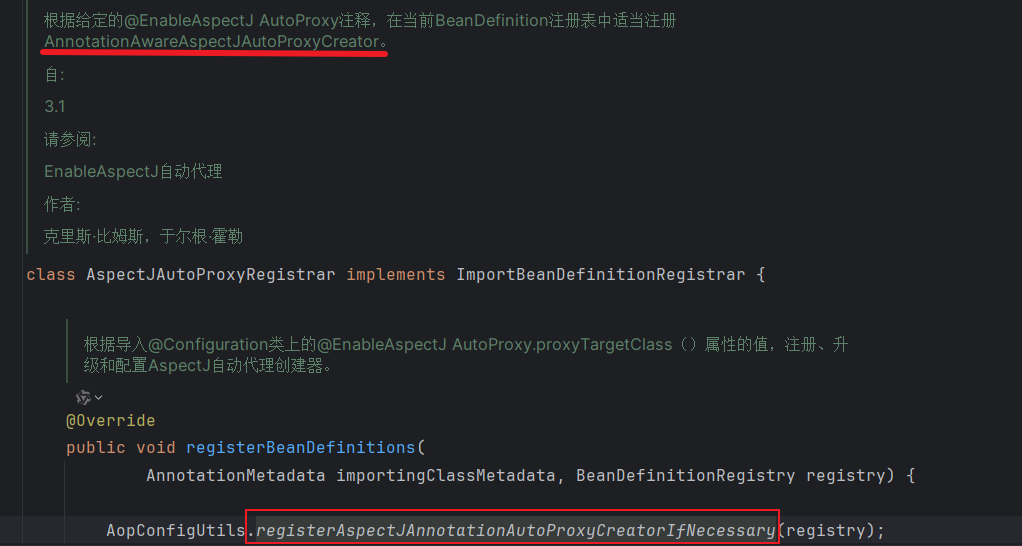
所以 @EnableAspectJAutoProxy 作用是向 Spring 容器中添加 AspectJAutoProxyRegistrar 类型的 Bean。
AspectJAutoProxyRegistrar 实现了 ImportBeanDefinitionRegistrar 接口,可以使用编程的方式来注册一些 Bean:
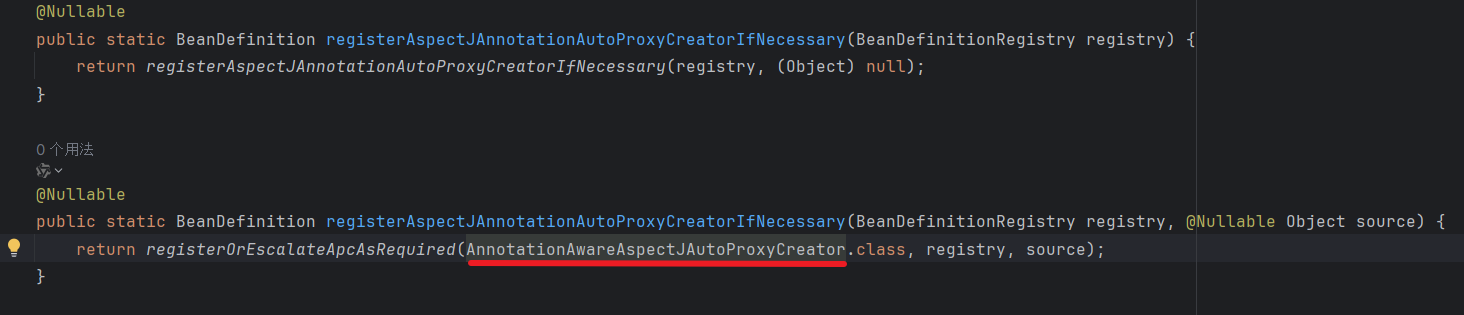
AopConfigUtils.registerAspectJAnnotationAutoProxyCreatorIfNecessary() 方法是注册 Bean 的主要逻辑:
最终注册了 <font style="color:#DF2A3F;">AnnotationAwareAspectJAutoProxyCreator</font>。
使用打印的内容 <font style="color:#DF2A3F;">org.springframework.aop.config.internalAutoProxyCreator</font>作为名称,获取 <font style="color:#DF2A3F;">AnnotationAwareAspectJAutoProxyCreator</font> 类型的 Bean,并查看<font style="color:#DF2A3F;">proxyTargetClass</font>属性的值:
1 2 3 4 5 6 7 8 9 10 11 12 13 14 15 16 17 18 19 20 21 22 23 24 25 26 27 28 29 30 31 32 33 34 35 public static void main (String[] args) { GenericApplicationContext context = new GenericApplicationContext (); StandardEnvironment environment = new StandardEnvironment (); environment.getPropertySources().addLast(new SimpleCommandLinePropertySource ("--spring.aop.auto=true" )); context.setEnvironment(environment); AnnotationConfigUtils.registerAnnotationConfigProcessors(context.getDefaultListableBeanFactory()); context.registerBean(Config.class); context.refresh(); Arrays.stream(context.getBeanDefinitionNames()).forEach(System.out::println); System.out.println(">>>>>>>>>>>>>>>>>>>>>>" ); AnnotationAwareAspectJAutoProxyCreator creator = context.getBean( "org.springframework.aop.config.internalAutoProxyCreator" , AnnotationAwareAspectJAutoProxyCreator.class); System.out.println(creator.isProxyTargetClass()); }
1 2 >>>>>>>>>>>>>>>>>>>>>> true
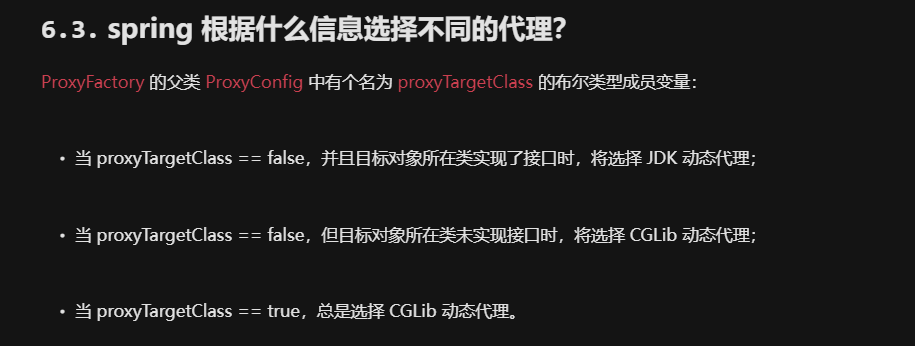
还记得 <font style="color:#DF2A3F;">proxyTargetClass</font>属性是做什么的吗?
请参考 : 黑马四十九讲AOP 6.3 .spring 根据什么信息选择不同的代理? 章节
41.3 数据库相关的自动配置 1 2 3 4 5 6 7 8 9 10 <dependency > <groupId > org.mybatis.spring.boot</groupId > <artifactId > mybatis-spring-boot-starter</artifactId > <version > 2.3.0</version > </dependency > <dependency > <groupId > com.mysql</groupId > <artifactId > mysql-connector-j</artifactId > </dependency >
DataSource 自动配置 1 2 3 4 5 6 7 8 9 10 11 12 13 14 15 16 17 18 19 20 21 22 23 24 25 26 27 28 29 30 public class DataSourceAuto { @Configuration @Import(MyImportSelector.class) static class Config { } static class MyImportSelector implements ImportSelector { public String[] selectImports(AnnotationMetadata importingClassMetadata) { return new String []{ DataSourceAutoConfiguration.class.getName(), MybatisAutoConfiguration.class.getName(), DataSourceTransactionManagerAutoConfiguration.class.getName(), TransactionAutoConfiguration.class.getName() }; } } }
1 2 3 4 5 6 7 8 9 10 11 12 13 14 15 16 17 18 19 20 21 22 23 24 25 26 27 28 29 30 31 32 33 34 35 public class DataSourceAuto { public static void main (String[] args) { GenericApplicationContext context = new GenericApplicationContext (); AnnotationConfigUtils.registerAnnotationConfigProcessors(context.getDefaultListableBeanFactory()); context.registerBean(Config.class); StandardEnvironment environment = new StandardEnvironment (); environment.getPropertySources().addLast( new SimpleCommandLinePropertySource ( "--spring.datasource.url=jdbc:mysql://localhost:3306/test" , "--spring.datasource.username=root" , "--spring.datasource.password=root" ) ); context.setEnvironment(environment); context.refresh(); HashMap<String, List<String>> map = new HashMap <>(); for (String name : context.getBeanDefinitionNames()) { String resourceDescription = context.getBeanDefinition(name).getResourceDescription(); map.computeIfAbsent(resourceDescription, k -> new ArrayList <>()).add(name); } map.forEach((k, v) -> System.out.println("来源 " +k + "= " +"名称 :" + v)); } }
1 来源 class path resource [org/springframework/boot/autoconfigure/jdbc/DataSourceConfiguration$Hikari.class]= 名称 :[jdbcConnectionDetailsHikariBeanPostProcessor, dataSource]
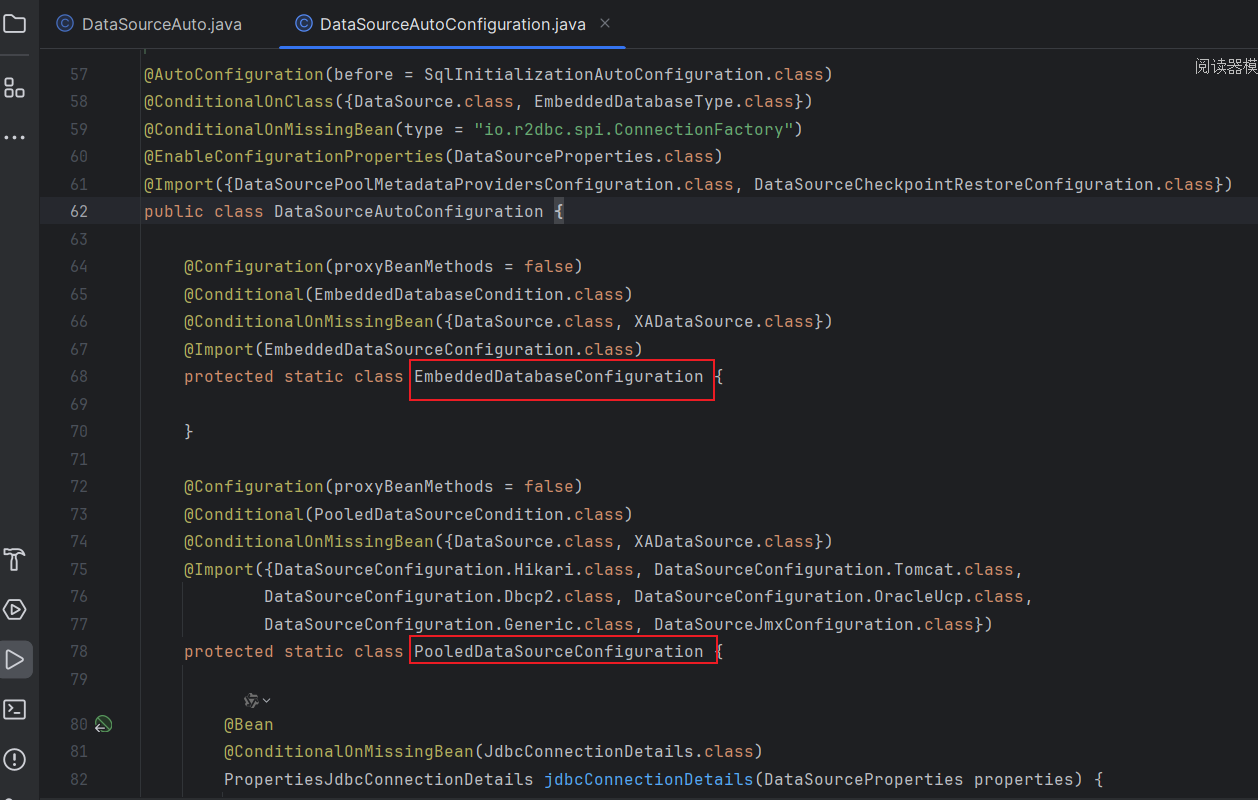
名叫 <font style="color:#DF2A3F;">dataSource</font>的 Bean 的来源是 <font style="color:#DF2A3F;">DataSourceConfiguration</font>,而不是 <font style="color:#DF2A3F;">DataSourceAutoConfiguration</font> 呢?
进入 DataSourceAutoConfiguration源码,
内部类 EmbeddedDatabaseConfiguration 和 PooledDataSourceConfiguration 都被 @Conditional注解标记,
当项目支持内嵌数据源时, EmbeddedDatabaseConfiguration 生效
当项目支持数据库连接池的数据源时,PooledDataSourceConfiguration生效
SpringBoot 默认数据库连接池是 Hikari,
所以PooledDataSourceConfiguration生效,
通过 @Import导入一系列 Bean 都是 DataSourceConfiguration的内部类,
所以 DataSource的 Bean 来源是 DataSourceConfiguration。
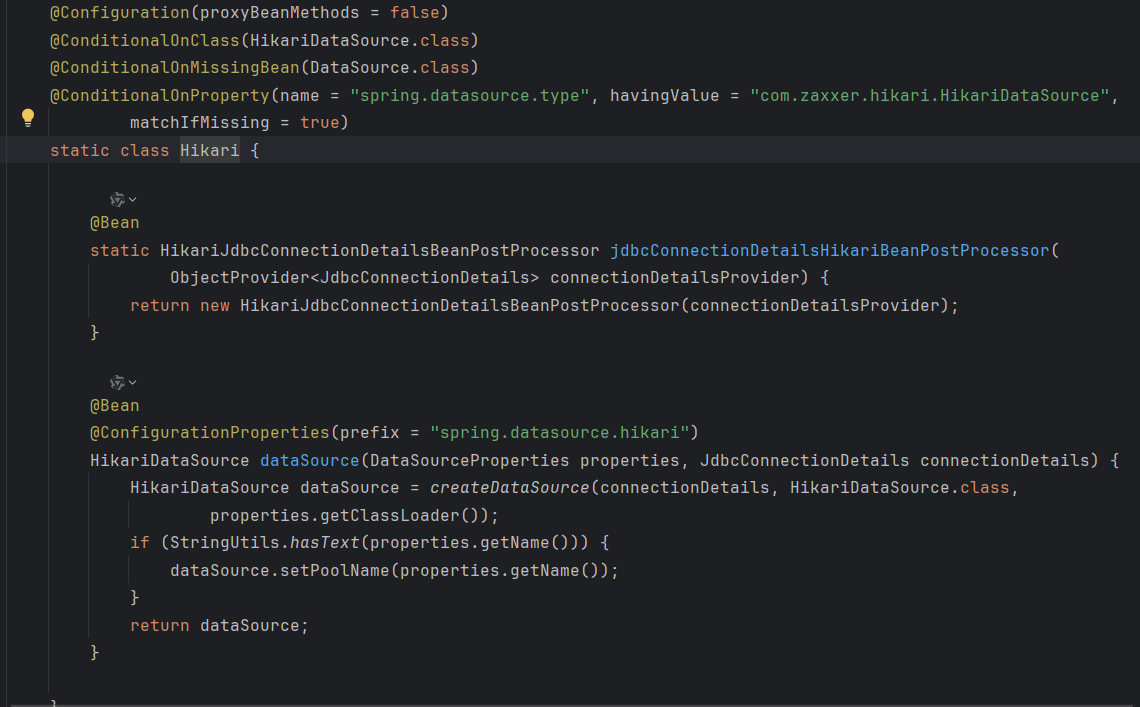
由于导入了 mybatis-spring-boot-starter,其内部依赖 mybatis-spring-boot-jdbc,而它又依赖了 HikariCP,因此最终数据库连接池 Hikari 生效:
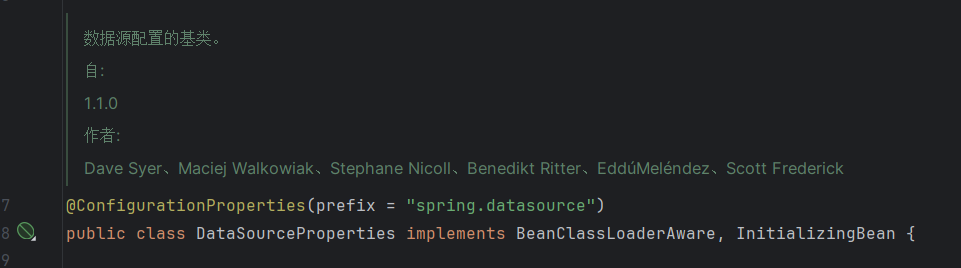
在 <font style="color:#DF2A3F;">Hikari#dataSource()</font> 方法中,接受一个 <font style="color:#DF2A3F;">DataSourceProperties</font> 类型的参数,这要求 Spring 容器中存在 <font style="color:#DF2A3F;">DataSourceProperties</font> 类型的 Bean。
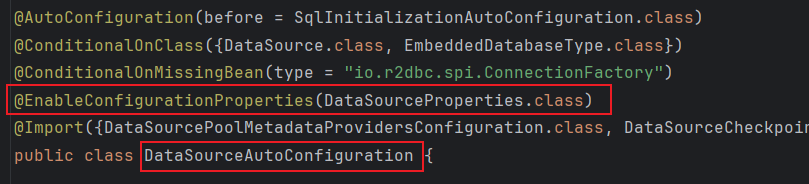
在最初的 <font style="color:#DF2A3F;">DataSourceAutoConfiguration</font> 自动配置类上有个 @<font style="color:#DF2A3F;">EnableConfigurationProperties</font> 注解,它将 <font style="color:#DF2A3F;">DataSourceProperties</font> 添加到容器中:
在 <font style="color:#DF2A3F;">DataSourceProperties</font> 中会绑定配置文件中以 <font style="color:#DF2A3F;">spring.datasource</font> 为前缀的配置:
获取 <font style="color:#DF2A3F;">DataSourceProperties</font> 类型的 Bean,并打印其 url、username 和 password:
1 2 3 4 5 6 7 8 9 10 11 12 13 14 15 16 17 18 19 20 21 22 23 24 25 26 27 28 29 30 public static void main (String[] args) { GenericApplicationContext context = new GenericApplicationContext (); AnnotationConfigUtils.registerAnnotationConfigProcessors(context.getDefaultListableBeanFactory()); context.registerBean(Config.class); StandardEnvironment environment = new StandardEnvironment (); environment.getPropertySources().addLast( new SimpleCommandLinePropertySource ( "--spring.datasource.url=jdbc:mysql://localhost:3306/test" , "--spring.datasource.username=root" , "--spring.datasource.password=root" ) ); context.setEnvironment(environment); context.refresh(); HashMap<String, List<String>> map = new HashMap <>(); for (String name : context.getBeanDefinitionNames()) { String resourceDescription = context.getBeanDefinition(name).getResourceDescription(); map.computeIfAbsent(resourceDescription, k -> new ArrayList <>()).add(name); } DataSourceProperties bean = context.getBean(DataSourceProperties.class); System.out.println(bean.getUrl()); System.out.println(bean.getUsername()); System.out.println(bean.getPassword()); }
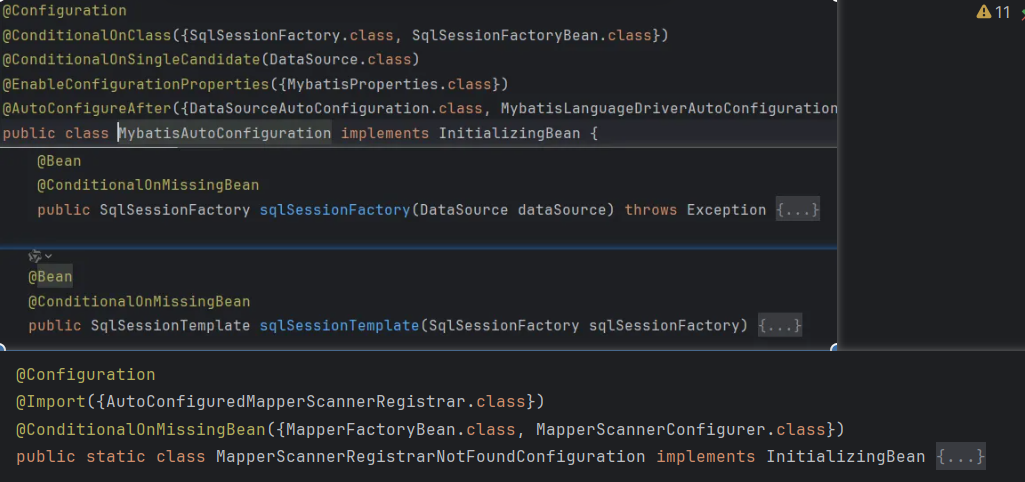
Mybatis 自动配置 进入 <font style="color:#DF2A3F;">MybatisAutoConfiguration</font>:
MybatisAutoConfiguration 的条件注解 <font style="color:#DF2A3F;">MybatisAutoConfiguration</font> 生效的条件有两个:
类路径下有SqlSessionFactory, SqlSessionFactoryBean
Spring 容器中 有且仅有 一个 DataSource的 bean添加了 ]
同时添加了 MybatisProperties 类型的 Bean 到 Spring 容器中,并与配置文件中以 mybatis 为前缀的信息绑定。
<font style="color:#DF2A3F;">@AutoConfigureAfter</font> 注解指定了当前自动配置类在 DataSourceAutoConfiguration 和 MybatisLanguageDriverAutoConfiguration 两个自动配置类解析完成之后再解析。
接下来是 <font style="color:#DF2A3F;">sqlSessionFactory()</font>方法:
依赖 Spring 容器的 <font style="color:#DF2A3F;">DataSource</font>,当容器中不存在 SqlSessionFactory 时,将其添加到 Spring 容器中。
SqlSessionTemplate 的作用 然后是 <font style="color:#DF2A3F;">sqlSessionTemplate()</font> 方法,它与添加 SqlSessionFactory 到 Spring 容器的逻辑一样:
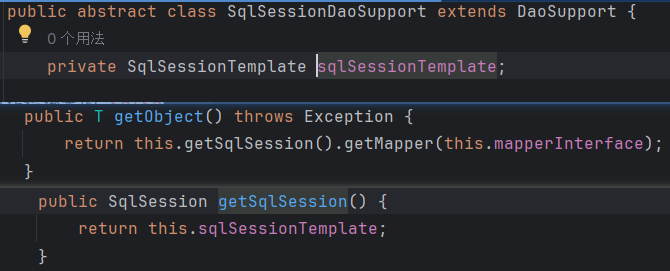
SqlSessionTemplate也是 SqlSession的实现,它提供与当前线程绑定的 SqlSession。
多个方法调用,如果它们来自同一个线程,那么获取的 SqlSession对象是同一个。
这也是 SqlSessionTemplate与 DefultSqlSession的区别。
在 Mybatis 中,MapperFactoryBean将接口转为对象,核心是 getObjext()方法,方法使用的是 SqlSessionTemplate
内部类MapperScannerRegistrarNotFoundConfiguration
@ConditionalOnMissingBean 判断 Spring 容器中缺失 MapperFactoryBean 和 MapperScannerConfigurer 时,该配置类生效。
生效时利用 @Import 导入 AutoConfiguredMapperScannerRegistrar:
AutoConfiguredMapperScannerRegistrar 实现了 <font style="color:#DF2A3F;">ImportBeanDefinitionRegistrar</font> 接口,允许通过编程的方式加 Bean 添加到 Spring 容器中(详细请 向上查找 : 41.1 补充 @Import 的@Improt 的 ImportBeanDefinitionRegistrar ),而这里是去扫描 Mapper 接口,将其转换为对象添加到 Spring 容器中。
在 main 方法所在类的包路径下创建 mapper 包,并创建 2 个带@Mapper 一个不带共计三个类:
1 2 3 4 5 6 7 8 9 10 @Mapper public interface Mapper1 {} @Mapper public interface Mapper2 {} public interface Mapper3 {}
运行 main() 方法,查看 Mapper1 和 Mapper2 是否被添加到 Spring 容器中。
结果是否定的。因为 没有设置要扫描的包路径 。
1 2 3 4 5 6 7 8 9 10 11 12 public static void main (String[] args) { String packageName = DataSourceAuto.class.getPackageName(); System.out.println("当前包名: " + packageName); AutoConfigurationPackages.register(context.getDefaultListableBeanFactory(), packageName); context.refresh(); }
1 2 3 当前包名: dai.dawang.a41.数据库相关的自动配置 来源 file [D:\workspace\advanced-spring\boot\target\classes\dai\dawang\a41\数据库相关的自动配置\mapper\Mapper1.class]= 名称 :[mapper1] 来源 file [D:\workspace\advanced-spring\boot\target\classes\dai\dawang\a41\数据库相关的自动配置\mapper\Mapper2.class]= 名称 :[mapper2]
@MapperScan 注解与 MybatisAutoConfiguration 在功能区别
<font style="color:#DF2A3F;">@MapeerScan</font> 可以指定扫描路径, 未指定时会把引导类范围内的所有接口当做 Mapper 接口;<font style="color:#DF2A3F;">MybatisAutoConfiguration</font> 关注所有被 @Mapper 注解标记的类并忽略 未被标记的接口。
事务自动配置 事务自动配置与 DataSourceTransactionManagerAutoConfiguration、TransactionAutoConfiguration 有关。
DataSourceTransactionManagerAutoConfiguration 配置了 DataSourceTransactionManager 用来执行事务的提交、回滚操作。
TransactionAutoConfiguration 在功能上对标 @EnableTransactionManagement,包含以下三个 Bean:
BeanFactoryTransactionAttributeSourceAdvisor:事务切面类,包含通知和切点TransactionInterceptor:事务通知类,由它在目标方法调用前后加入事务操作AnnotationTransactionAttributeSource:解析 @Transactional 及事务属性,还包含了切点功能
如果自定义了 DataSourceTransactionManager 或是在引导类加了 @EnableTransactionManagement,则以自定义为准。
MVC 自动配置 MVC 自动配置用到 4 个类:
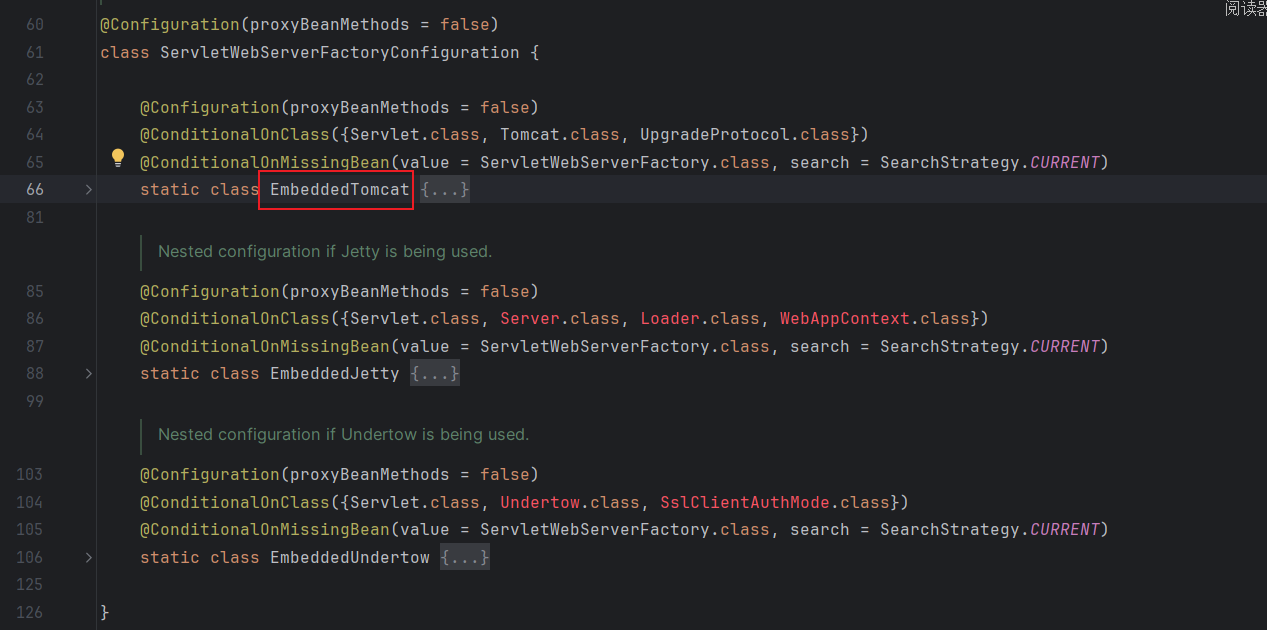
配置内嵌 Tomcat 服务器工厂:ServletWebServerFactoryAutoConfiguration
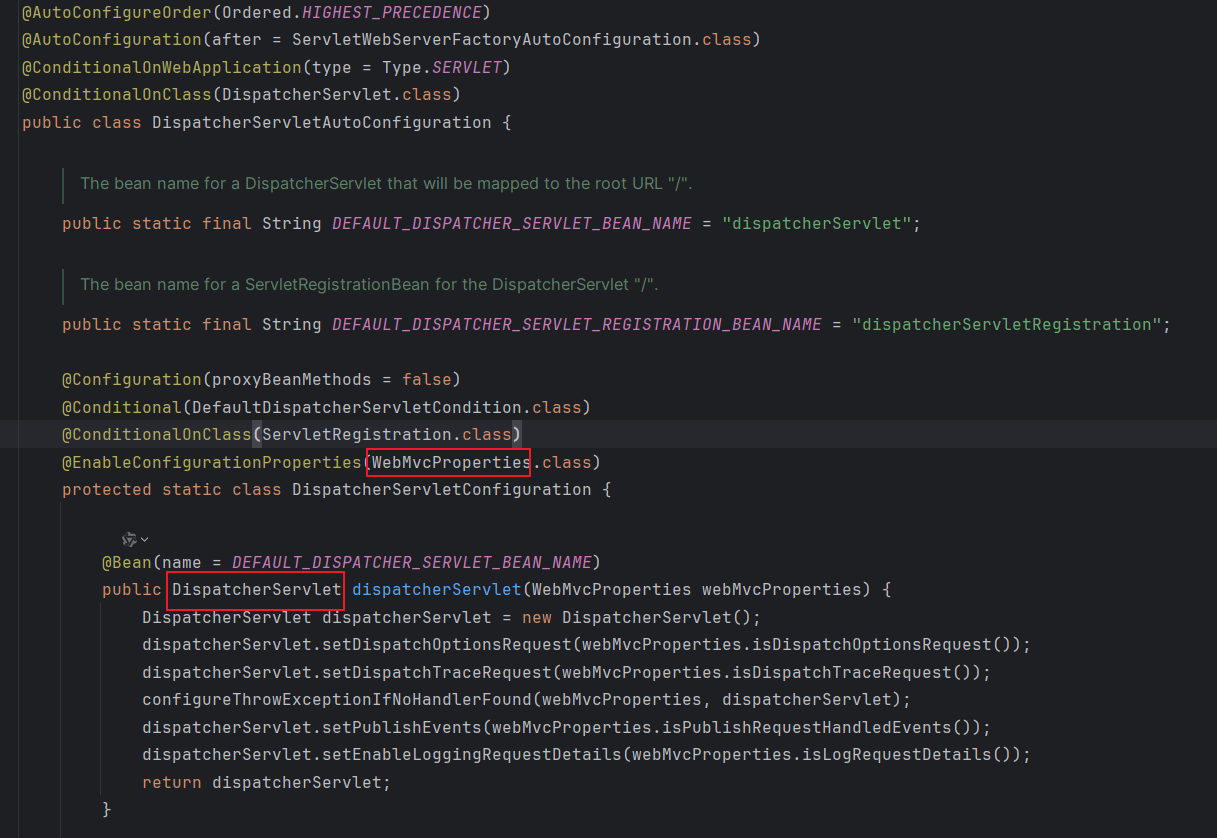
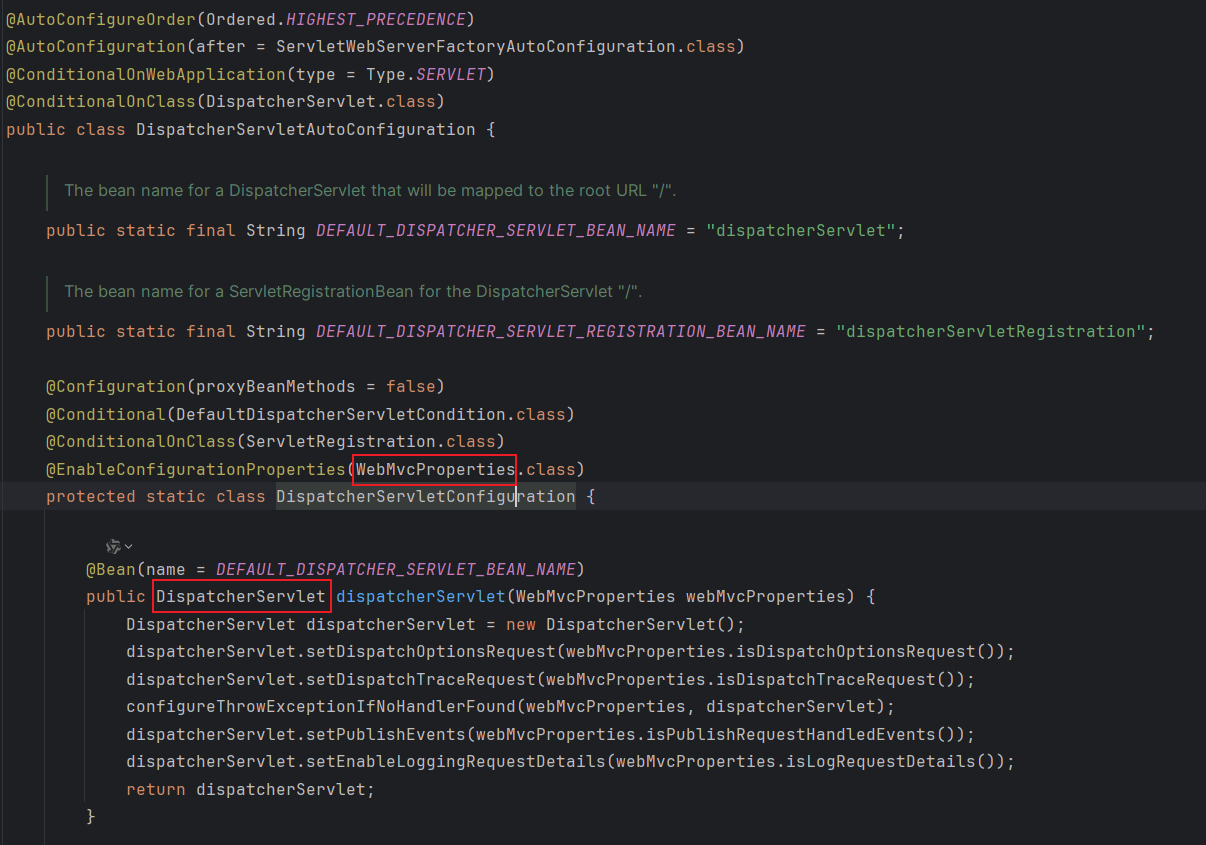
配置 DispatchSerlet:DispatcherServletAutoConfiguration
配置 WebMVC 各种组件:WebMvcAutoConfiguration
配置 MVC 的错误处理: ErrorMvcAutoConfiguration
1 2 3 4 5 6 7 8 9 10 11 12 13 14 15 16 17 18 19 20 21 22 23 24 25 26 27 28 29 30 31 32 33 34 35 36 public class MvcAuto { public static void main (String[] args) { AnnotationConfigServletWebServerApplicationContext context = new AnnotationConfigServletWebServerApplicationContext (); context.registerBean(Config.class); context.refresh(); for (String name : context.getBeanDefinitionNames()) { String source = context.getBeanDefinition(name).getResourceDescription(); if (source != null ) { System.out.println(name + " 来源:" + source); } } context.close(); } @Configuration @Import(MyImportSelector.class) static class Config { } static class MyImportSelector implements DeferredImportSelector { @Override public String[] selectImports(AnnotationMetadata importingClassMetadata) { return new String []{ ServletWebServerFactoryAutoConfiguration.class.getName(), DispatcherServletAutoConfiguration.class.getName(), WebMvcAutoConfiguration.class.getName(), ErrorMvcAutoConfiguration.class.getName() }; } } }
tomcatServletWebServerFactory: 来源ServletWebServerFactoryConfiguration$EmbeddedTomcat
来源 class path resource [org/springframework/boot/autoconfigure/web/servlet/ServletWebServerFactoryAutoConfiguration.class]= 名称 :[servletWebServerFactoryCustomizer, tomcatServletWebServerFactoryCustomizer]
分别表示 web 的扩展 与 tomcat 的扩展
来源 class path resource [org/springframework/boot/autoconfigure/web/servlet/DispatcherServletAutoConfiguration$DispatcherServletConfiguration.class]= 名称 :[dispatcherServlet]
来源 null = 名称 :[org.springframework.boot.autoconfigure.web.servlet.DispatcherServletAutoConfiguration$DispatcherServletRegistrationConfiguration]
自定义自动配置类 在 SpringBoot 自动配置自定义组件分为两步:
在类路径下自定义 META-INF/spring.factories文件,以 org.springframework.boot.autoconfigure.EnableAutoConfiguration 为 key,设置需要自动装配的自定义组件的全限定类名为 value
编写配置类,添加 @EnableAutoConfiguration注解
SpringBoot2.7.0 及其以后版本 在类路径下自定义 META-INF/spring/org.springframework.boot.autoconfigure.AutoConfiguration.imports文件,文件 每一行 表示需要自动装配的类的全限定类名,所以不要随便换行
42.条件装配底层 42.1@Conditional 在 SpringBoot 的自动配置中,经常看到 <font style="color:#DF2A3F;">@Conditional</font>注解,该注解可以按条件加载配置类
<font style="color:#DF2A3F;">@Conditional</font> 注解是通过指定的 Class 实现 Condition接口 进行判断
现在判断类路径下是否存在 org.springframework.boot.autoconfigure.jdbc.DataSourceProperties 来加载不同的配置类, 当存在 DataSourceProperties 时加载 AutoConfiguration1,反之加载 AutoConfiguration2。
1 2 3 4 5 6 7 8 9 10 11 12 13 14 15 16 17 18 19 20 21 22 23 24 25 26 27 28 29 30 31 32 33 34 35 36 37 38 39 40 41 42 43 44 45 46 47 48 49 50 51 52 53 54 55 56 57 58 59 60 61 62 63 64 65 66 67 68 69 70 71 72 73 74 75 76 77 78 79 80 81 82 83 84 85 86 87 88 89 90 91 92 93 94 95 package dai.dawang.a42条件装配底层;import dai.dawang.a41.自动配置原理.A41;import org.springframework.context.annotation.*;import org.springframework.context.support.GenericApplicationContext;import org.springframework.core.type.AnnotatedTypeMetadata;import org.springframework.core.type.AnnotationMetadata;import org.springframework.util.ClassUtils;import java.util.Arrays;public class a42 { public static void main (String[] args) { GenericApplicationContext context = new GenericApplicationContext (); context.registerBean(ConfigurationClassPostProcessor.class); context.registerBean(Config.class); context.refresh(); Arrays.stream(context.getBeanDefinitionNames()).forEach(System.out::println); } @Configuration @Import(MyImportSelector.class) static class Config { } static class MyImportSelector implements DeferredImportSelector { @Override public String[] selectImports(AnnotationMetadata importingClassMetadata) { return new String []{AutoConfiguration1.class.getName(), AutoConfiguration2.class.getName()}; } } static class MyCondition1 implements Condition { @Override public boolean matches (ConditionContext context, AnnotatedTypeMetadata metadata) { return ClassUtils.isPresent("org.springframework.boot.autoconfigure.jdbc.DataSourceProperties" , null ); } } static class MyCondition2 implements Condition { @Override public boolean matches (ConditionContext context, AnnotatedTypeMetadata metadata) { return !ClassUtils.isPresent("org.springframework.boot.autoconfigure.jdbc.DataSourceProperties" , null ); } } @Configuration @Conditional(MyCondition1.class) static class AutoConfiguration1 { @Bean public Bean1 bean1 () { return new Bean1 ("bean1" ); } } @Configuration @Conditional(MyCondition2.class) static class AutoConfiguration2 { @Bean public Bean2 bean2 () { return new Bean2 ("bean2" ); } } static class Bean1 { private String name; public Bean1 (String name) { this .name = name; } } static class Bean2 { private String name; public Bean2 (String name) { this .name = name; } } }
1 2 3 4 org.springframework.context.annotation.ConfigurationClassPostProcessor dai.dawang.a42条件装配底层.a42$Config dai.dawang.a42条件装配底层.a42$AutoConfiguration1 bean1
项目导入了,所以MyCondition1 返回 ture,所以 AutoConfiguration1 的@Conditional 生效,所以导入 bean1
1 2 3 4 5 <dependency > <groupId > org.mybatis.spring.boot</groupId > <artifactId > mybatis-spring-boot-starter</artifactId > <version > 3.0.3</version > </dependency >
42.2@ConditionalOnXxx @ConditionalOnXxx 注解的使用,这种注解是将某个 <font style="color:#DF2A3F;">@Conditional</font> 的判断进行了封装,比如 ConditionalOnClass 就是用于判断某个 Class 是否存在。
因此针对上文中的代码可以做出修改:
自定义 @ConditionalOnClass注解,填入需要判断的全限定类名和判断条件
移除模拟的第三方配置上的 @Conditional注解,而是使用自定义的 @ConditionalOnClass
重写 Condition#matches() 方法
1 2 3 4 5 6 7 8 9 10 11 12 13 14 15 16 17 18 19 20 21 22 23 24 25 26 27 28 29 30 31 32 33 34 35 36 37 38 39 40 41 42 43 44 45 46 47 48 49 50 51 52 53 54 55 56 57 58 59 60 61 62 63 64 65 66 67 68 69 70 71 72 73 74 75 76 77 78 79 80 81 82 83 84 85 86 87 88 89 90 91 92 93 94 95 96 97 98 99 public class a42ConditionalOnXxx 注解 { public static void main (String[] args) { GenericApplicationContext context = new GenericApplicationContext (); context.registerBean(ConfigurationClassPostProcessor.class); context.registerBean(Config.class); context.refresh(); Arrays.stream(context.getBeanDefinitionNames()).forEach(System.out::println); } @Configuration @Import(MyImportSelector.class) static class Config { } static class MyImportSelector implements DeferredImportSelector { @Override public String[] selectImports(AnnotationMetadata importingClassMetadata) { return new String []{AutoConfiguration1.class.getName(), AutoConfiguration2.class.getName()}; } } static class ConditionalOnBean implements Condition { @Override public boolean matches (ConditionContext context, AnnotatedTypeMetadata metadata) { Map<String, Object> annotationAttributes = metadata.getAnnotationAttributes(ConditionalOnClass.class.getName()); Object o = annotationAttributes.get("classNames" ); boolean present = Boolean.FALSE; if (ObjectUtil.isNotEmpty(o)) { List<String> collect = Arrays.stream((String[]) o).toList(); for (String name : collect) { present = ClassUtils.isPresent(name, null ); } } boolean exits = ((boolean ) annotationAttributes.get("exits" )); return exits ? present : !present; } } @Target(ElementType.TYPE) @Retention(RetentionPolicy.RUNTIME) @Conditional(ConditionalOnBean.class) static @interface ConditionalOnClass { boolean exits () default true ; String[] classNames() default {}; } @Configuration @ConditionalOnClass(classNames = "org.springframework.boot.autoconfigure.jdbc.DataSourceProperties", exits = true) static class AutoConfiguration1 { @Bean public Bean1 bean1 () { return new Bean1 ("bean1" ); } } @Configuration @ConditionalOnClass(classNames = "org.springframework.boot.autoconfigure.jdbc.DataSourceProperties", exits = false) static class AutoConfiguration2 { @Bean public Bean2 bean2 () { return new Bean2 ("bean2" ); } } static class Bean1 { private String name; public Bean1 (String name) { this .name = name; } } static class Bean2 { private String name; public Bean2 (String name) { this .name = name; } } }
由于引入了 <font style="background-color:rgba(255, 255, 255, 0);">mybatis-spring-boot-starte</font> 所以打印 bean1:
1 2 3 4 org.springframework.context.annotation.ConfigurationClassPostProcessor dai.dawang.a42条件装配底层.a42ConditionalOnXxx注解$Config dai.dawang.a42条件装配底层.a42ConditionalOnXxx注解$AutoConfiguration1 bean1